Incident reports owners sign for
When something happens, report it on the dog's booking: what happened, how serious, what you did, photos and witnesses. The owner is emailed and signs to say they have read it.
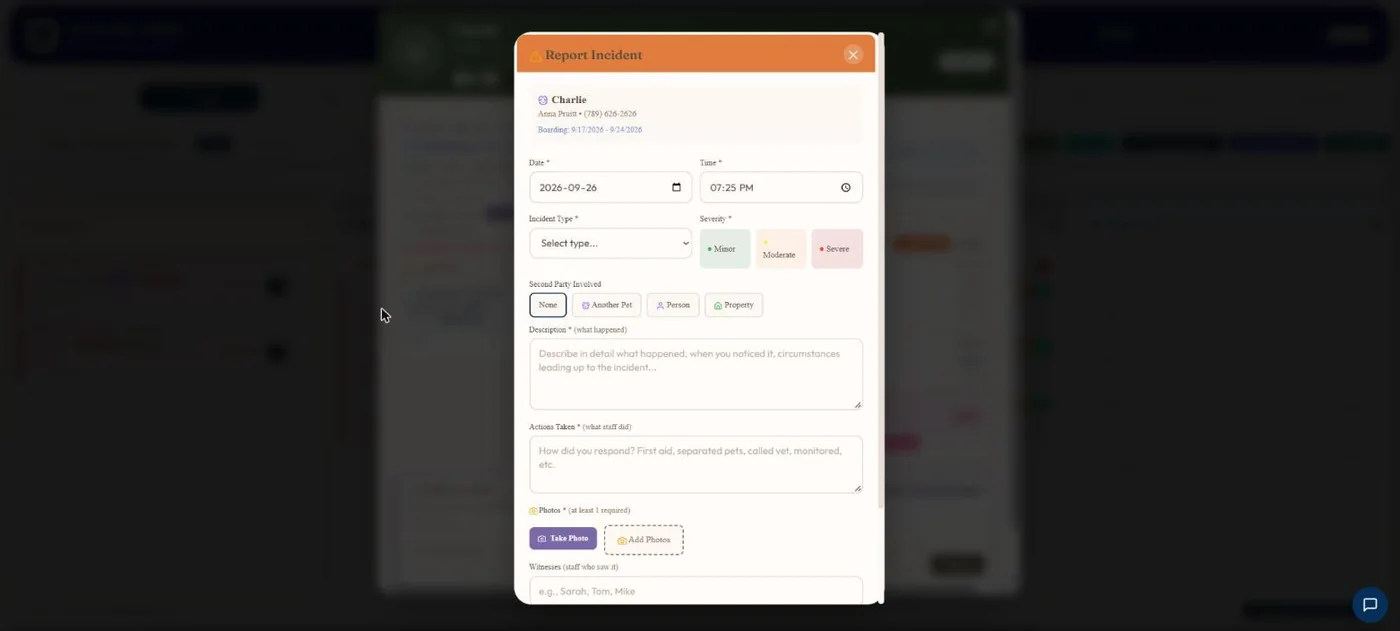
- 1Fight, bite, injury, medical emergency, behaviour, escape attempt, property damage or other.
- 2Minor, moderate or severe.
- 3Another pet and its owner, a person, or property.
- 4What happened and what staff did.
- 5Photos from the phone or computer.
Hover a number, or tap the screen to see it full size.
What it does
Report a fight, bite, injury or escape with severity, photos, witnesses and vet notes. Both owners are emailed their own version and sign to acknowledge it. Export to PDF.
Everything captured
Type, severity, date and time, description, actions taken, photos, witnesses and whether a vet was called.
Owners told right away
The owner gets an email and a push notification. The shop gets a copy.
Dog-on-dog handled properly
Both owners get their own version and neither sees the other owner's contact details.
Signed acknowledgement
The owner signs in their account to say they have read it, with optional comments.
PDF export
Download any report as a PDF.
Pending or acknowledged
Filter reports by whether the owner has signed.
How it works
Open the booking
Tap Incident on a checked-in dog.
Fill it in
Type, severity, what happened, photos.
Owners are told
Email and push, each owner separately.
They sign
You see who has acknowledged it.
What your clients see
Owners get an email and a push, read the report in their account, and sign to acknowledge it. Each owner signs separately.
Good to know
- The owner signs by typing their name, not by drawing.
- Reports are filed on a dog that is currently checked in.
- At least one photo is required.
Questions
Are owners notified automatically?
Yes, by email and push notification.
What about the other dog's owner?
They get their own version. Neither owner sees the other's contact details.
Do I have proof they saw it?
Yes. Their signature and the time are saved.
Can I print a report?
Yes, as a PDF.
Related features
Try it with your own bookings
Every feature is included. Start a free trial, no card needed.