A cancellation policy that does the maths
Boarding can be strict while daycare stays relaxed. You set tiers like "within 48 hours, keep the deposit", the customer sees the exact cost before they confirm, and staff can waive it with a reason.
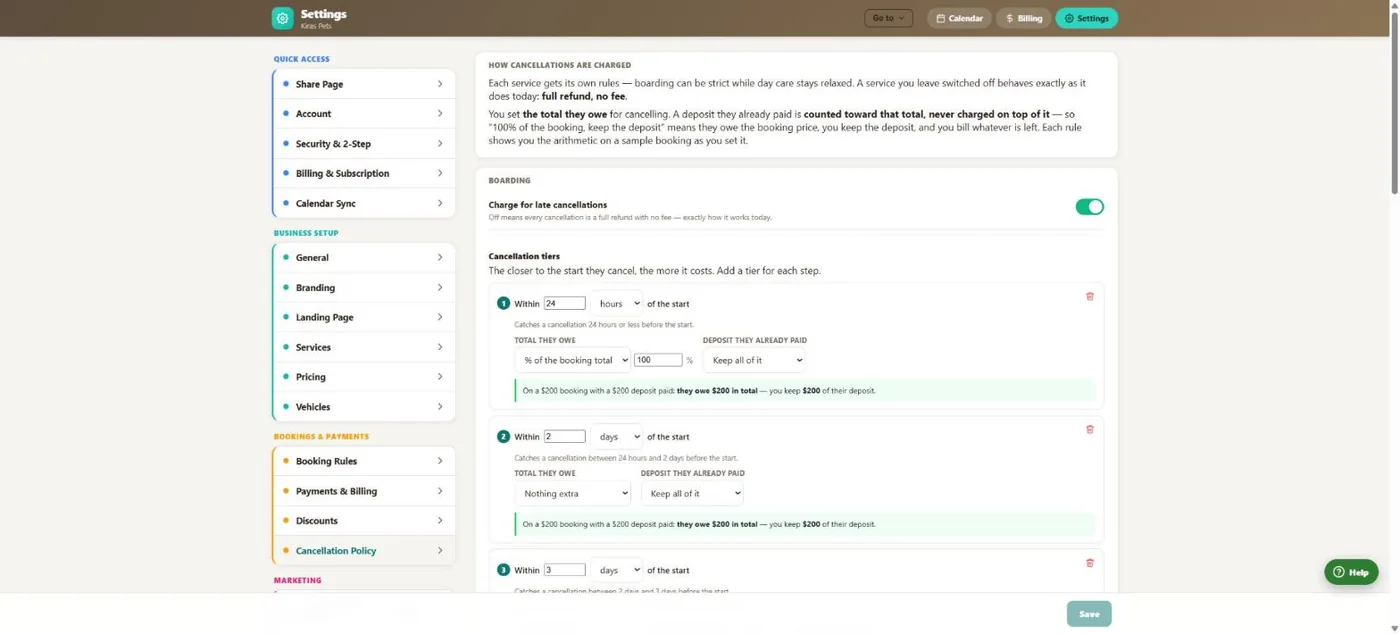
- 1A deposit counts toward what they owe. It is never charged on top.
- 2Switch it on per service. Leave a service off and cancelling stays free.
- 3Each tier covers a window before the start, in hours or days.
- 4Choose what they owe (nothing, a % or a flat fee) and what happens to the deposit.
- 5Every rule shows the arithmetic on a sample booking as you set it.
Hover a number, or tap the screen to see it full size.
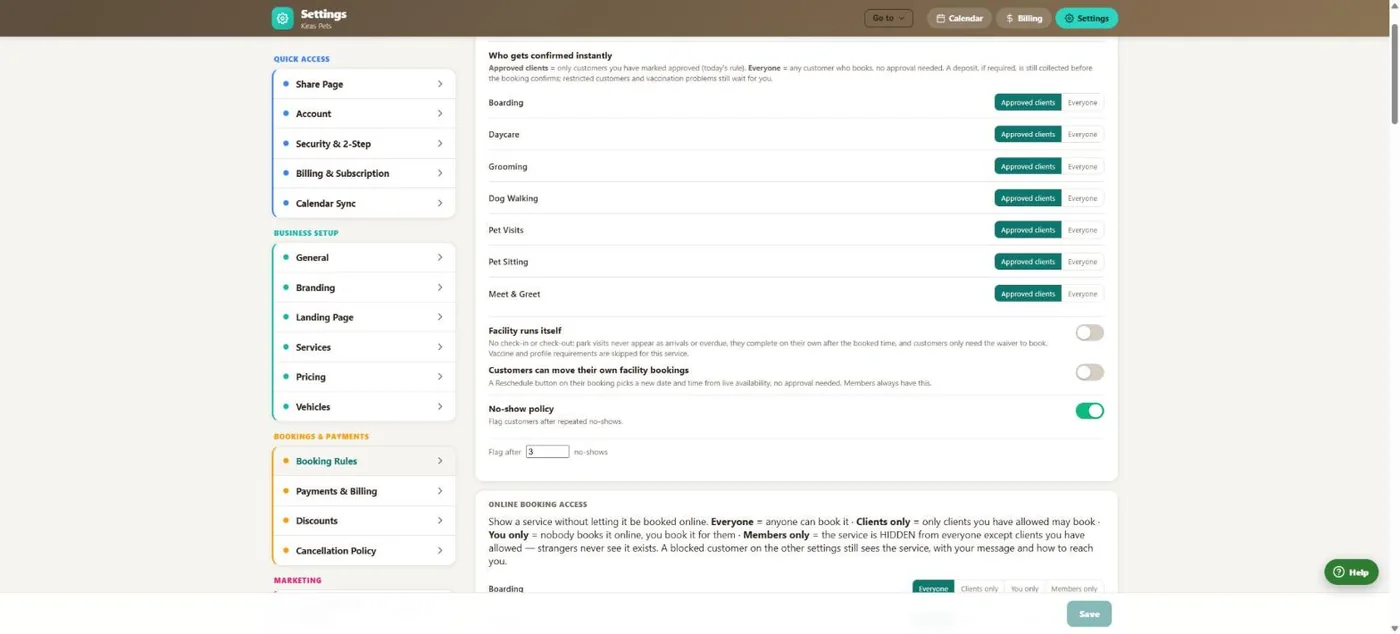
- 1Choose who is confirmed instantly and who waits for your approval.
- 2Turn on the no-show policy.
- 3After this many no-shows, the client's bookings need your approval.
Hover a number, or tap the screen to see it full size.
What it does
Set cancellation tiers per service, decide what happens to the deposit, and show customers the exact fee before they confirm. Flag repeat no-shows automatically.
Tiers for each service
Up to as many windows as you like, per service: what the customer owes and whether the deposit is kept, refunded or partly refunded.
The cost is shown first
Before a customer confirms a cancellation they see the fee, what happens to their deposit, the refund and the whole tier ladder. The button names the result.
One calculation everywhere
Desktop, the phone app and the customer screens all use the same rules, so the number never differs by screen.
Staff can override
Waive or change the fee on any booking. The reason and the staff member are recorded.
No-show handling
Mark a no-show, keep what was paid on a settled invoice, and after the number you choose the client needs approval for every booking.
Policy they sign
Attach your cancellation policy to the waiver: our template, your own wording or your PDF.
How it works
Set the rules
For each service, add the windows and what happens in each one.
Customer asks to cancel
They see the exact fee and refund, then send the request.
You approve
Approve or deny. You can waive the fee, and the reason is kept.
Money is settled
Refund to the card, to account credit, or bill a cancellation fee on its own invoice.
What your clients see
Customers see the fee, their deposit outcome and the refund before they confirm. The button says exactly what will happen, for example "Cancel and forfeit $60".
Good to know
- The policy never charges anyone by itself. It is applied when you approve a cancellation or mark a no-show.
- Customers request cancellations and you approve them. They cannot cancel instantly.
- "Restricted" after repeat no-shows means every booking needs your approval. It does not block the client.
Questions
Can boarding be strict and daycare relaxed?
Yes. Every service has its own tiers, and a service with no policy switched on stays free to cancel.
Does the customer know the fee before cancelling?
Yes. The fee, the deposit outcome and the refund are shown before they confirm.
What happens to the deposit?
You choose per tier: keep it, refund it in full, or refund part of it. It counts toward the fee, so it is never charged twice.
Can I waive the fee for a regular?
Yes, on any booking. The reason and who waived it are recorded.
What does the no-show setting do?
It counts no-shows per client. At the number you choose, that client's bookings need your approval.
Related features
Try it with your own bookings
Every feature is included. Start a free trial, no card needed.