Every walker, every walk, on one board.
One board for every walker, every walk and every dog. Drag a dog onto a walk, copy the day to next week, and let each client's plan decide what they pay and when the invoice goes out.
Free 30-day trial · No credit card · $39.99 CAD a month, no per-walk fees
Walking on your own? See the solo dog walking app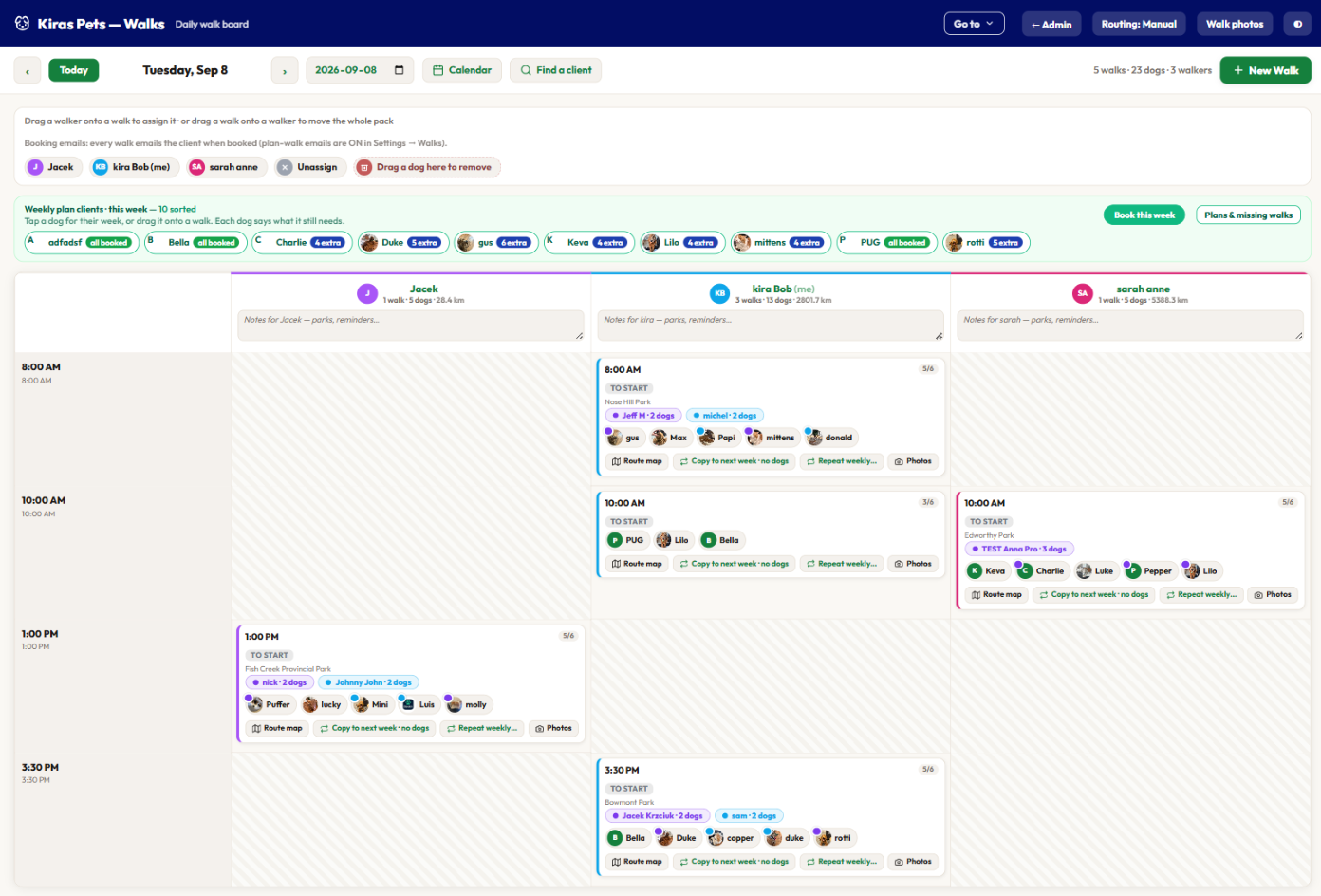
Three months with Hitch-A-Hike in Victoria, BC.
BooknBuddy already ran solo dog-walking businesses. What it had not done was run a company with several walkers whose day changes on the day. Hitch-A-Hike asked about our walking features, and we spent the next three months learning how they run their walks: how the morning is planned, what goes wrong by ten o'clock, and what the walker in the van needs in their hand when it does. Everything on this page was built against that business and is in daily use there.
A multi-walker day that survives contact with the morning.
- A dog has to move to another walker at the last minute, and that has to be as easy on the phone in the van as on the computer at the desk.
- Weeks of walks planned ahead without every placement sending the client an email and a push. Fifty plan clients times five walks is 250 messages nobody asked for.
- The same walks run on the same days. Build them once and have them there next week.
- Each walker needs their own schedule and their own notifications, not a copy of the owner's.
- Clients on plans, billed after the week, with a second-dog discount when the dogs actually walk together.
The board, the walker app and the billing on this page.
- Drag a dog between walkers on the desktop board or on the phone. The walk, the walker's list and the client's app all update at once.
- Plan walks are placed quietly. The client hears from you when it matters: the invoice, the on-my-way push, the walk report.
- Copy to next week and Repeat weekly, plus morning-or-afternoon requests that you place onto whichever walk is running.
- A walker app where each walker sees their own day, gets their own pushes, and runs the route from pickup to report.
- Bill-after weekly plans, a plan rate per dog, and the same-walk second-dog discount. See sections 2 to 4.
Every walker, their own view
A walker signs in and sees their walks, their dogs, their route. Pushes go to the walker on the walk, not to everyone.
Paid by the dog and the walk type
Walker pay is worked out per dog walked and per walk type, so a solo walk and a pack walk can pay differently. See payroll.
Messaging in the app, not by SMS
Clients and the business message each other inside the app, photos included, free and unlimited. No per-text carrier bill. Texting stays optional.
A whole week of walks in a few minutes.
The board is a day: one column per walker, one card per walk. Everything on it moves by dragging.
Press New Walk, give it a time, a walker and a park, and it is on the board. Drag a dog from the plan strip onto the card. Drag a walker onto a walk to assign it, or drag the walk onto a walker to move the whole pack. Drop a dog on the bin to take it off.
When Tuesday looks right, copy it to next week or set it to repeat weekly. The dogs come along or stay behind, your choice each time.
- Drag and drop everything. Dogs between walks, walkers onto walks, whole packs between walkers.
- Copy to next week or Repeat weekly from the card, with or without the dogs.
- Each card shows the households on it, capacity such as 5 of 6, and warns before you overfill it.
- Private walks for one dog sit on the same board and will not merge into a group by accident.
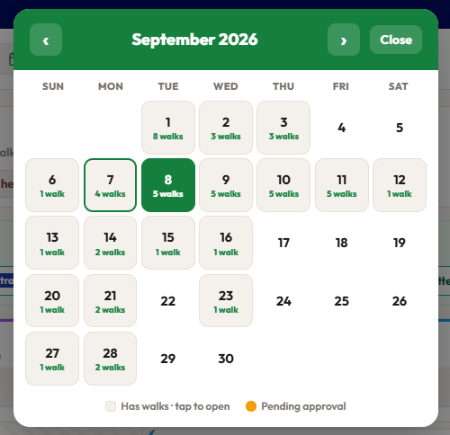
- Month overview with a walk count per day, plus a client search that jumps straight to their walks.
Weekly walk plans, prepaid or billed after.
Regulars pay less per walk the more they commit to. You choose whether the week is paid before it starts or after it happens.
Set a per-walk price for one, two, three, four or five walks a week. A client commits to a frequency and that is their rate. Each dog in a household can be on its own frequency, a senior at two a week and the young one at four, and the house still gets one invoice.
- Prepay: the invoice for next week goes out automatically. Paying it opens that week's walks; until then they sit on the board frozen.
- Bill after: no commitment. The walks that actually happened are gathered up and billed at the agreed plan rate, extra walks included.
- A single reminder on the morning a prepaid week starts unpaid, only to the people who have not paid.
- Paid weeks become walk credits. Cancel a walk and the credit comes back; spend it on a one-off at the till.
- Plan walks are placed quietly. One-off walks still email the client when booked, and invoices and reports always send.
Invoice per walk, per day, per week, every two weeks, or monthly.
Set a default for the business, then change it for any customer who asks. Walks bill when they complete and roll up into one invoice for the period.
Most shops want one invoice a week. A corporate client wants monthly. The retired couple round the corner want to pay as they go. All three can be true at once, because the schedule lives on the customer, not the business.
- Per booking: the invoice is raised the moment the walk is marked complete.
- Daily, weekly, bi-weekly, monthly: completed walks wait, then land on one invoice. Weekly and bi-weekly pick the send day; bi-weekly picks its anchor date.
- A pack walk can mix clients on different schedules. Each dog bills its own way.
- Every invoice and payment syncs to QuickBooks Online or Xero, with the tax code on it.
- Card on file, Pay links, or pay at pickup. Square and Stripe both supported.
Second-dog discounts that know which dogs walked together.
A flat amount off the second dog and the third, with a floor you will not go under.
Set the amount once. Two dogs from one home on the same walk get it, and the invoice line says why the second dog is cheaper. If they walk separately that week, the discount is not applied, because it was never earned.
- Flat dollars, not a percentage: $5 off the second dog, $4 off the third, and the third-dog rate carries on from there.
- A floor price. The discount never takes a plan dog below the lowest you will walk for.
- A standing rate per customer, say 10% off walks, applies on top for the clients you have promised it to.
- Promo codes work on walks. So do weekend and holiday surcharges, late-booking fees and distance-based travel fees.
- Every price is stamped on the booking with its breakdown. The walker's card, the invoice and the client's app all show the same number.
Flag the dogs that should never share a walk.
Flag the pair once. From then on every add and every drag checks it.
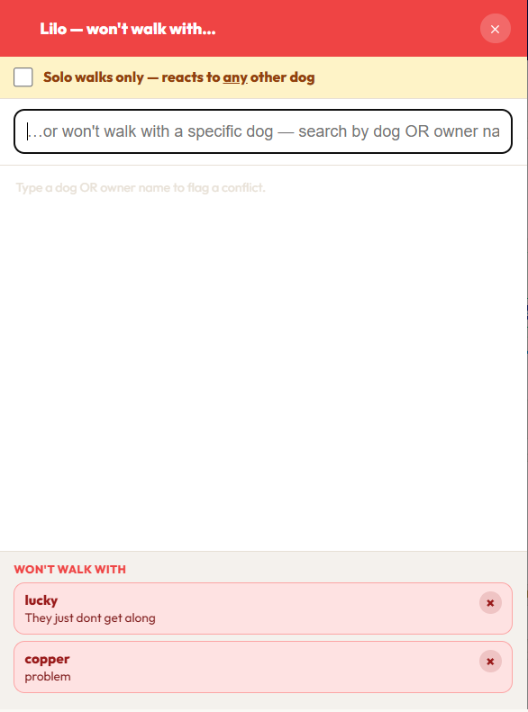
Open a dog, type the other dog's name or the owner's, add a note. The flag is mutual, so it does not matter which of the two you drag. The board warns you before the walk saves and lets you override it if you know better that day.
- Won't walk with: a named dog, with a reason your walkers can read.
- Solo walks only: for a dog that reacts to every other dog. It carries a SOLO badge on every board, including the walker's phone.
- Warnings, not walls. Capacity, conflicts and private-walk merges all ask first and take your answer.
- The same flags follow the dog into the walker app, so a stand-in walker gets the same warning you would.
GPS tracked walk reports, with the tracking under your control.
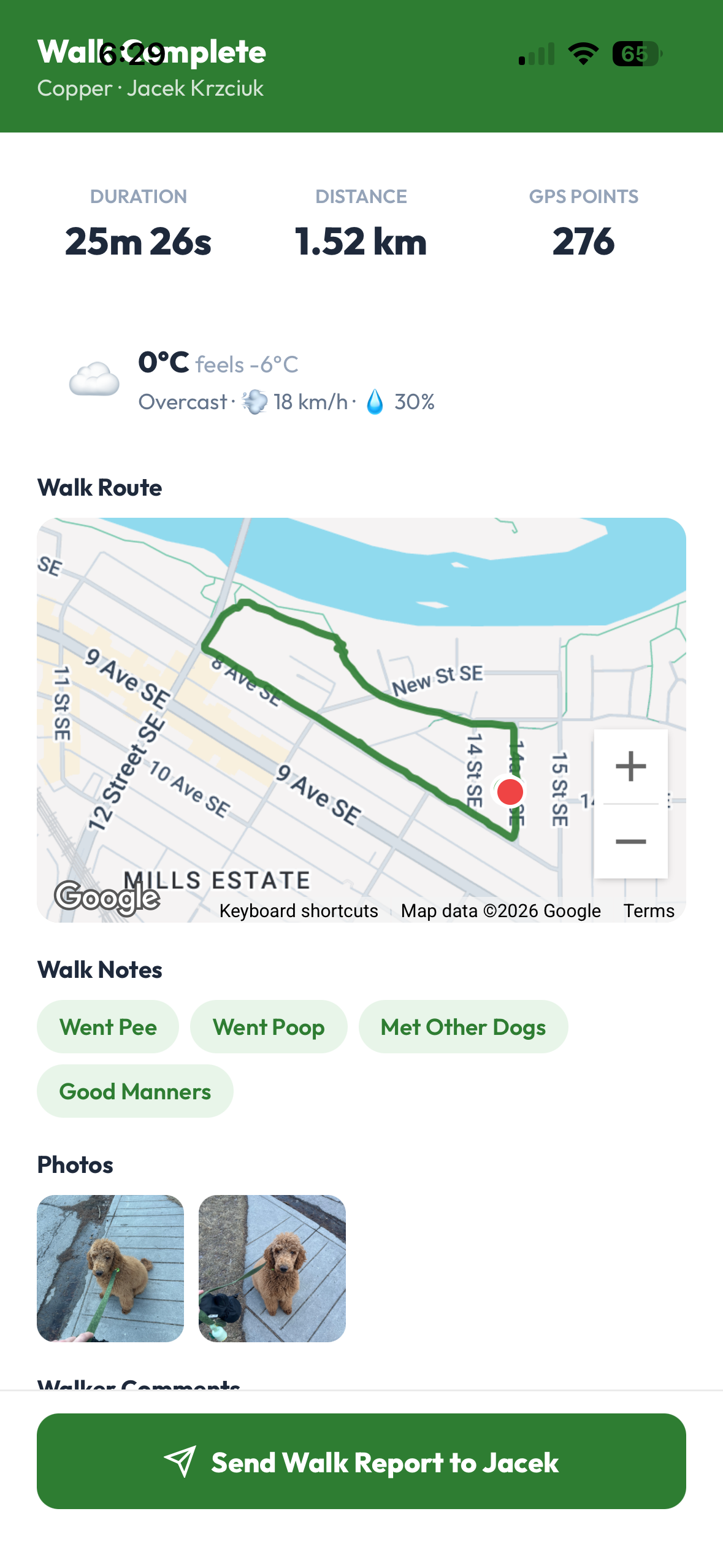
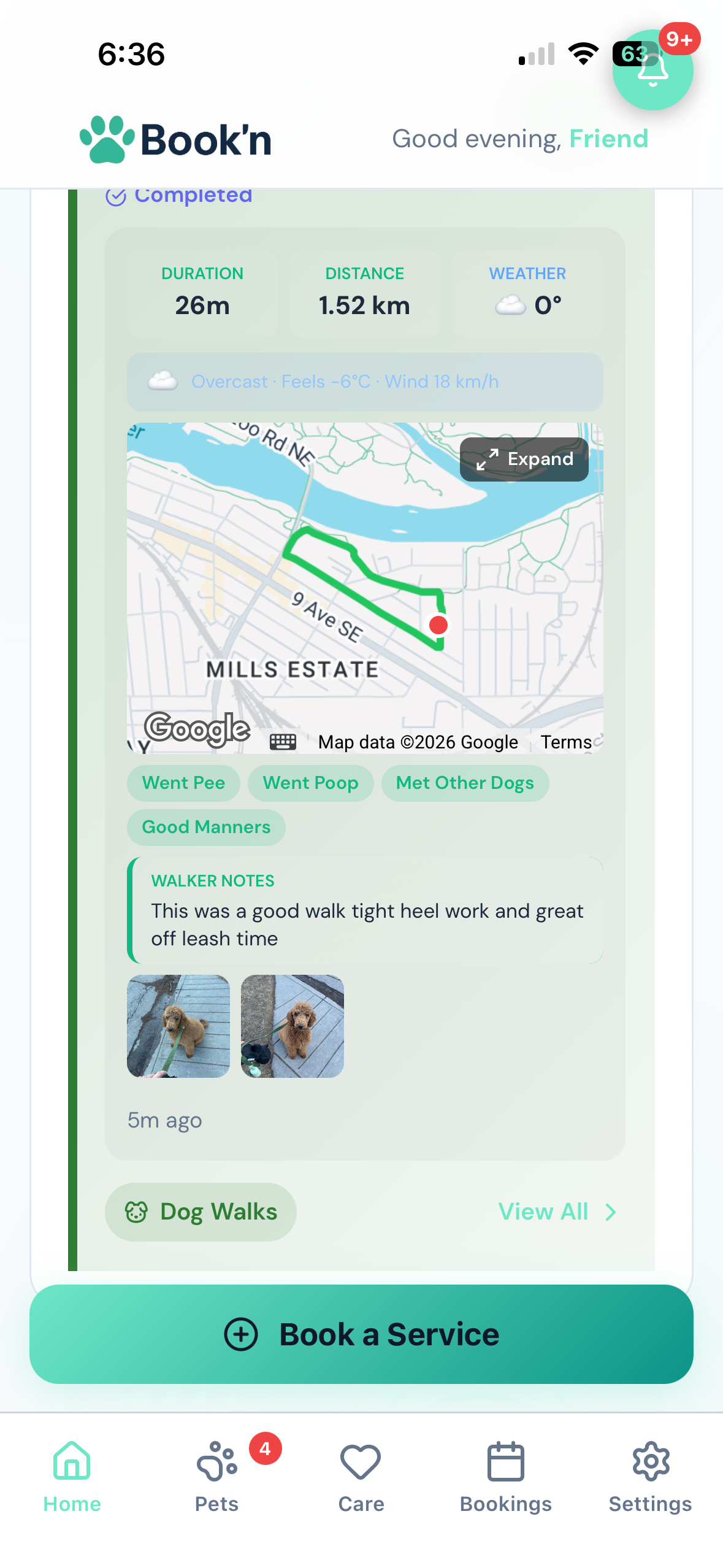
Every dog gets a report card the moment it is dropped off. You decide what is printed on it.
The walker's phone draws the route, counts the distance, pulls the weather and takes the photos. Some shops want the owner to see all of that. Some do not want a GPS trail or a stopwatch on the card. Two switches settle it, and the times are still recorded for your own records either way.
- Route map on or off. Off means no map and no GPS point count on the owner's card. The weather, the photos and the notes stay.
- Walk length and times on or off. Pick-up and drop-off are still saved on the booking.
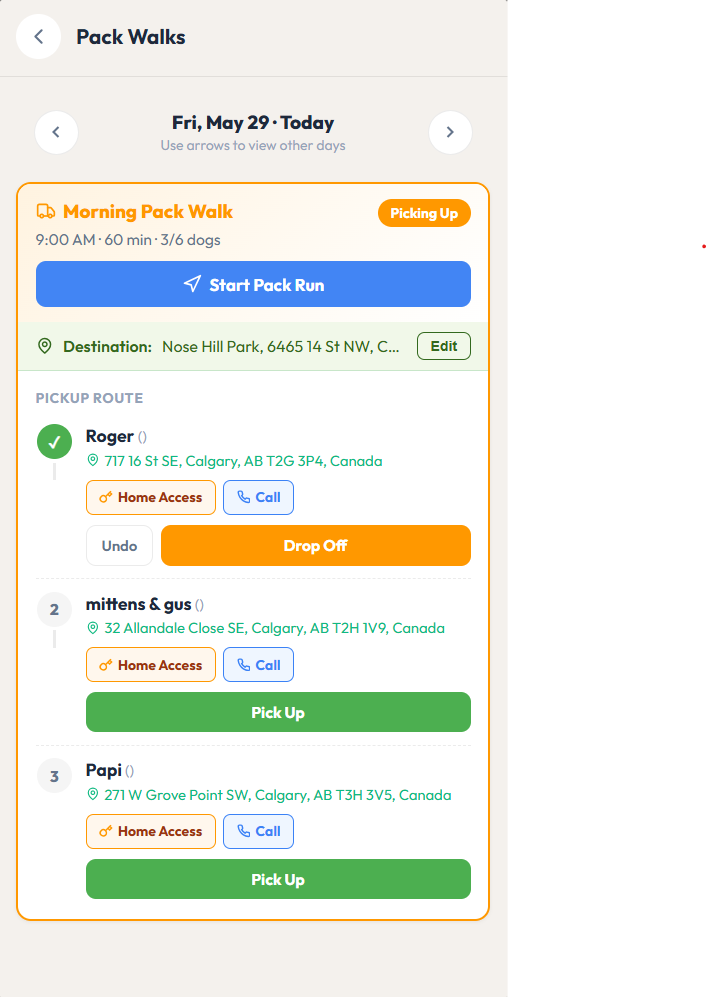
- Pickup order by live traffic. Start run puts the pickups in the fastest order from where the walker is, using real drive times, then on to the park and back for drop-offs. Dogs from one home are one stop, and the first owner is told you are on the way with an arrival time.
- Or manual routing. Walkers order their own pickups, remembered per weekday, and every owner notification waits for a button press.
- Photos per dog from the run screen, a gallery of the last seven days, and a report editor that keeps a record of every edit.
- The whole run opens as a multi-stop route in the walker's maps app, and the mileage tracker logs the drive with CRA and IRS deduction rates built in.
Walker payroll, worked out from the walks themselves.
Walkers are paid by the dog and by the walk type. Nothing is typed in twice: the board already knows who walked which dog, so payroll reads it.
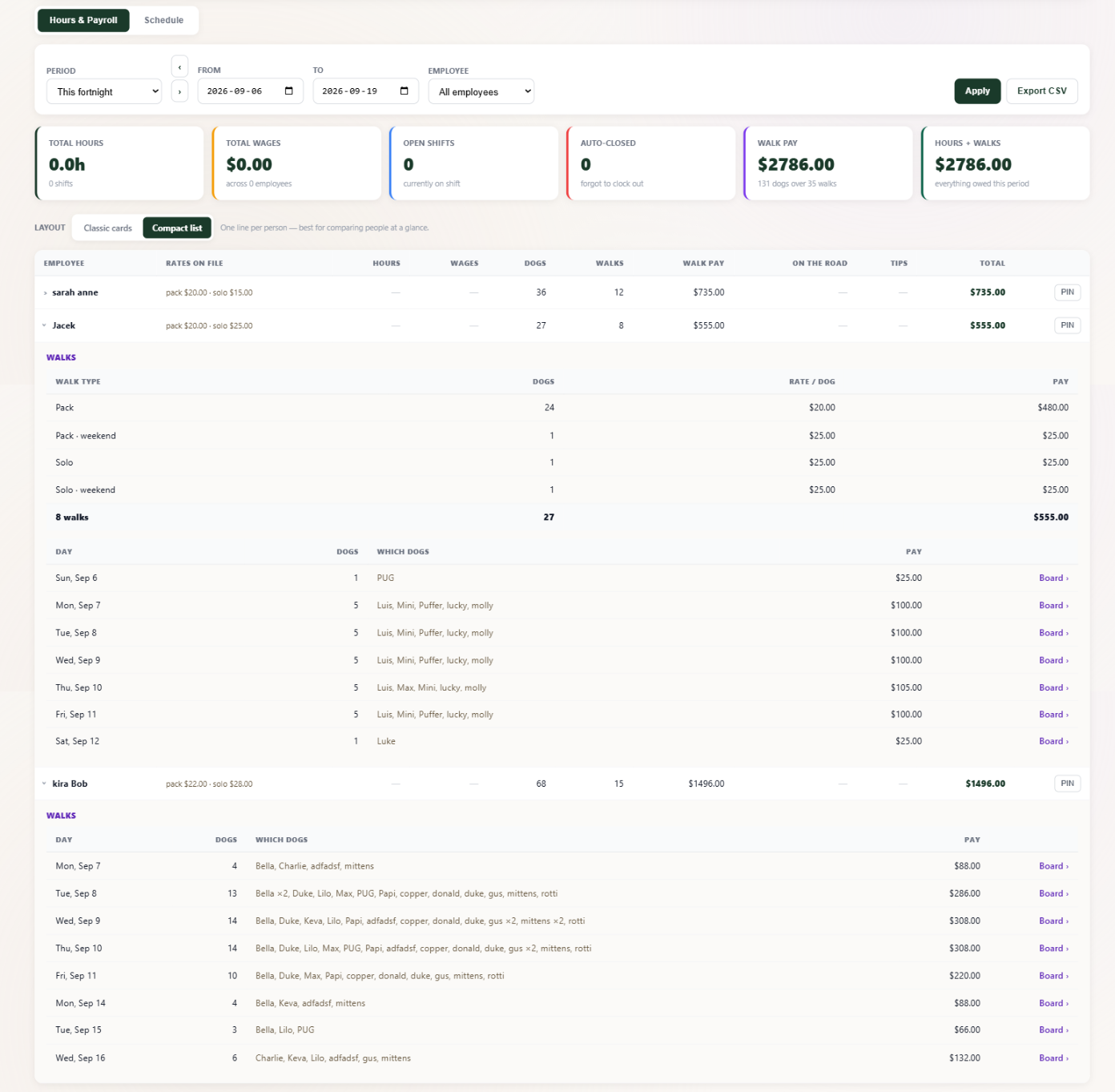
The compact list: one line per walker, expand anyone for pay by walk type and a day-by-day list that names every dog. A Classic cards layout is one click away for a bookkeeper who wants every line open at once.
Each walker has their own rates, because a senior walker costs more than a new one. A five-dog pack walk is five dogs at the pack rate. A Saturday pays the weekend rate if you set one. Move a dog to another walker on the board and the pay moves with it, because there is no separate pay record to fall out of date.
- Per dog, per walk type. Pack, solo, weekend pack, weekend solo, plus hosting nights and departure walks for home boarders.
- A missing rate is flagged, not zeroed. Payroll says which walks are unpaid and which rate is missing, before payday rather than after.
- Pay periods that match the payslip: weekly, fortnightly, twice a month or monthly, stepped with one click.
- Hourly staff on the same page. Clock-in shifts with a rate per role, auto-closed shifts flagged, hours by role reconciled to wages.
- Export CSV for the bookkeeper: shifts, then one row per dog walked.
- The walker sees the same number. Their app shows each day's walks, the dogs on them, and what the day paid, from the same rule payroll uses.
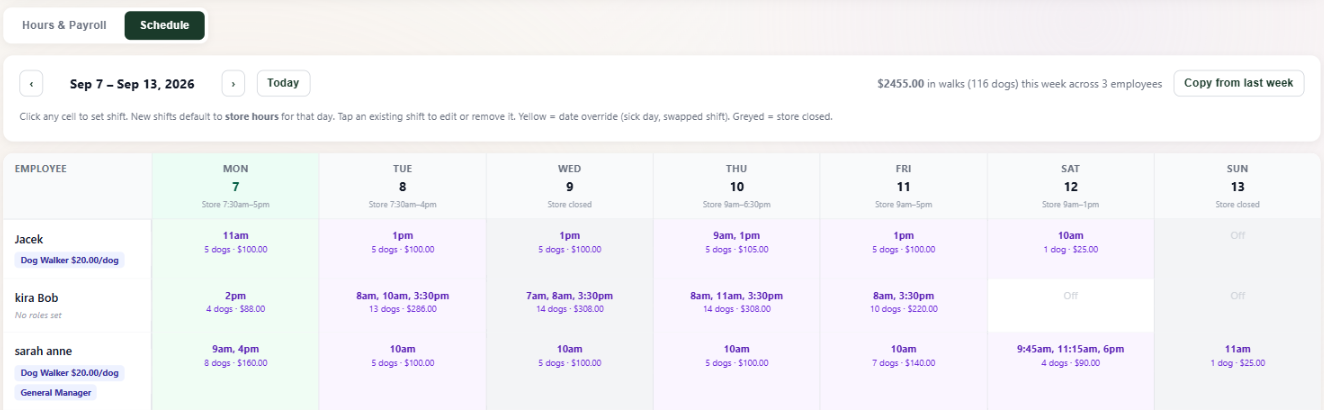
The Schedule tab is the same week from the walker's side. Each cell is a walker's day: start times, how many dogs, what it pays, with the week's total in the corner. Hourly staff set shifts in the same grid, defaulting to store hours, and every day links back to the board.
The walker runs the day from a phone. The owner reads it from theirs.
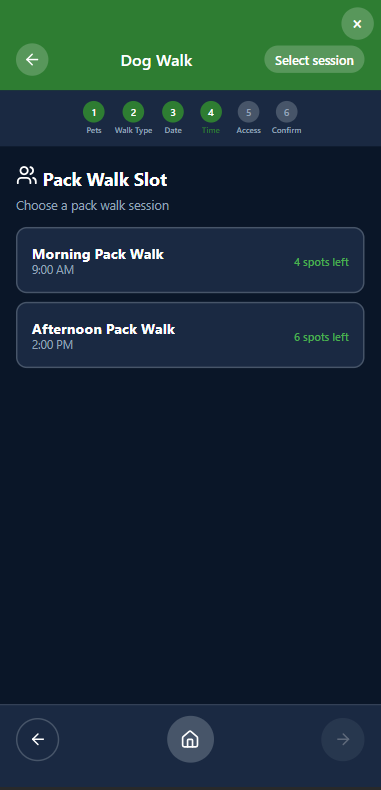
Pickup list in route order, per-dog Pick Up and Drop Off, then a report in the client's app before the van is back.
Everything else a walking business needs.
Included in the subscription. Nothing here is an add-on except texting.
Travel fees by distance
Three zones, a flat rate, or a free radius. The client's address prices itself at booking.
Morning or afternoon requests
Clients can ask for a daypart instead of a fixed walk. Place it on any walk that day by picker or drag; placing it sends the confirmation.
Vaccination gate
Expired vaccines block new bookings, pack walks included, until the new record is uploaded.
Waivers and home access
Signed once and versioned. Gate codes and key notes on every stop for whoever is walking.
Deposits or pay to book
Take a deposit, full payment up front, or nothing until the walk. Per service.
Holidays and closures
Your closed days come off every plan's target for the week, so nobody is chased for a walk that never ran.
Messaging, texting optional
In-app messages and photos are free. Texting is the one paid add-on.
Walker permissions
Decide who can build walks, move dogs, run routes, edit prices or see revenue and mileage.
Build next week's walks on the free trial.
Thirty days, no card. Set your walk prices and plan tiers, put a client on a weekly plan, and watch the invoice go out by itself. $39.99 CAD a month after that, however many walks you run.
Start Free TrialQuestions? info@booknbuddy.com