Every feeding, pill and let-out, ticked offNEW
You do not type feedings in as tasks. Every dog's meals, meds, let-outs and add-ons appear on today's list from their booking, and each tick records who did it and when.
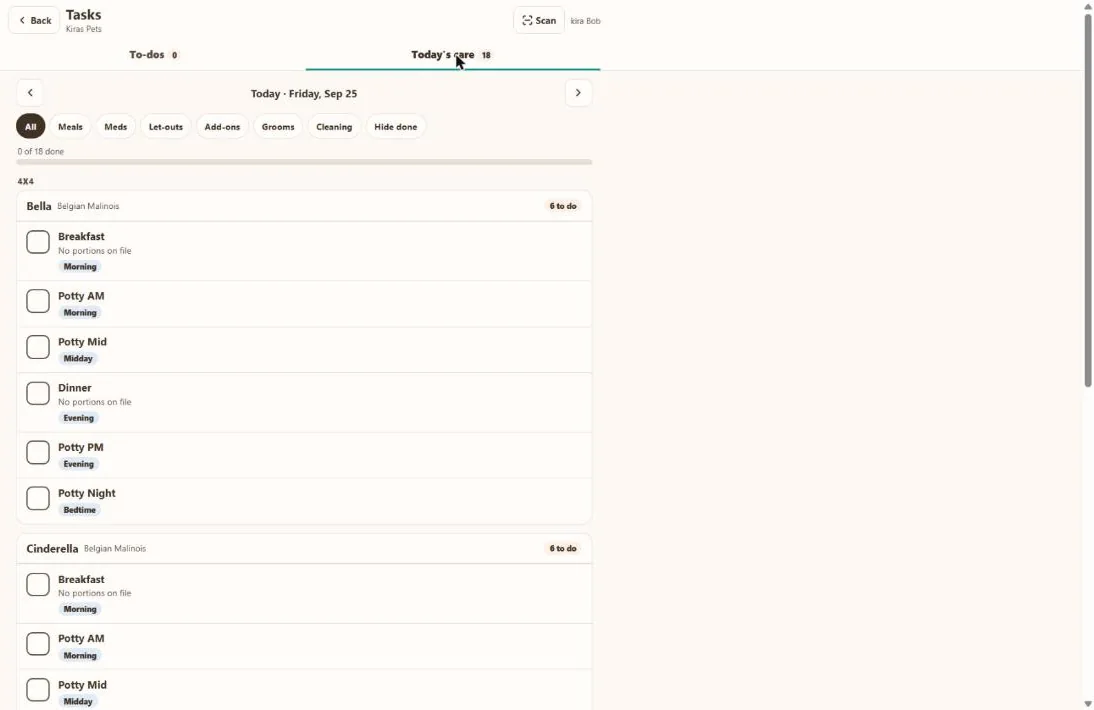
- 1Move between days.
- 2Filter by meals, meds, let-outs, add-ons, grooms or cleaning.
- 3Progress for the day.
- 4Each task for each dog, with the time of day.
- 5Scan a kennel card QR code to open that kennel's tasks.
Hover a number, or tap the screen to see it full size.
What it does
Care tasks for every dog are built from their bookings: meals, medications, add-ons, let-outs and grooms. Add your own to-dos, assign them, repeat them and get reminders.
Care tasks from bookings
Meals, medications, add-ons, let-outs (morning to bedtime) and in-stay grooms, per dog, per day.
Clean kennel
A cleaning task on each going-home day.
A record of every tick
Who did it, when, and whether it was scanned from the kennel card.
Your own to-dos
Add a to-do with a due time, a kennel and a person, or leave it for anyone.
Repeats
Daily, weekdays, chosen days each week, monthly, or every few days.
Reminders
A push notification at the time, a little before, or the day before.
How it works
Bookings come in
Care tasks appear for each dog automatically.
Staff tick them
On a phone or at the desk, or by scanning the card.
Add to-dos
Anything else, assigned and repeating.
Check it
See what is done and who did it.
Good to know
- The task list is new and being switched on shop by shop.
- Reminders are push notifications. There are no email or text reminders.
- There is no task report or export yet.
Questions
Do I have to enter feedings as tasks?
No. They come from each dog's booking and profile.
Can I see who fed a dog?
Yes. Every tick records the person and the time.
Can tasks repeat?
Yes. Daily, weekdays, chosen days, monthly or every few days.
How do the QR codes work?
Scan the code on a kennel card to open that kennel's tasks.
Related features
Try it with your own bookings
Every feature is included. Start a free trial, no card needed.