About thirty emails you never have to send
Confirmations, deposit requests, reminders, receipts and pick-up notices go out on their own. Pick a layout and colour, reword any email, and preview it live.
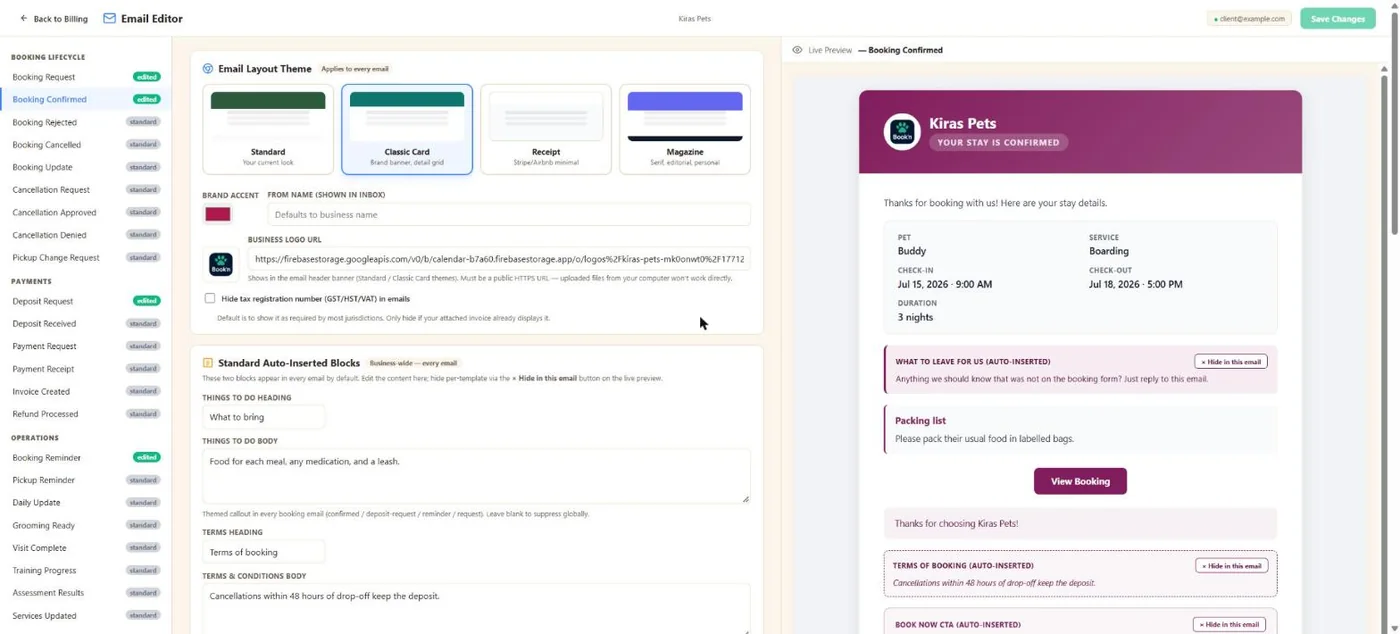
- 1Every email, grouped by booking, payments and operations.
- 2Standard, Classic Card, Receipt or Magazine.
- 3Your accent colour, sender name and logo.
- 4Blocks added to every booking email, like what to bring and your terms.
- 5A live preview as you type.
Hover a number, or tap the screen to see it full size.
What it does
Booking, payment and reminder emails go out on their own, in your brand. Choose a layout, reword anything, switch emails on or off per service, and hold customer emails while you set up.
Booking lifecycle
Request, confirmed, rejected, cancelled, updated, cancellation request, approved and denied, pick-up change.
Payments
Deposit request and received, payment request, receipt, invoice created and refund processed.
Reminders
A reminder a few days out, 48 and 24 hours before (10 AM your time), and boarding pick-up reminders.
Your brand
Four layouts, your colour, sender name and logo, or your own HTML.
Per service
Switch any email on or off for customers or for you, service by service.
Hold while you set up
Hold every customer email while you import clients. Your own notifications keep coming.
How it works
Pick a look
Layout, colour and logo.
Reword
Subjects, openings and sections.
Choose per service
Which emails go out, and to whom.
Forget about it
They send on their own.
What your clients see
Clients get clear, branded emails at every step, with the booking details and a button to view or pay.
Good to know
- Your logo must be a web link (HTTPS).
Questions
Can I change the wording?
Yes. Subjects, openings, sections, or your own full HTML.
Can I stop daycare reminders but keep boarding ones?
Yes. Reminders can be switched per service.
Can I import clients without emailing them?
Yes. Hold all customer emails while you set up.
When do reminders go out?
A few days before, then 48 and 24 hours before, at 10 AM your time.
Related features
Try it with your own bookings
Every feature is included. Start a free trial, no card needed.