Pet care software that’s priced on the month you actually had
Gingr, MoeGo, Paw Partner and PetExec are all good software, and BooknBuddy does everything they do and more. Where we’re different is the bill. They charge you the same amount every month, busy or not. We start at $39.99, and your price only goes up in the months your business does.
From $39.99 CAD or US$29.99 a month. Free for the first 30 days, with every feature included.
We move with you.
A busy month puts a lot more bookings, reminders, texts and payments through our system, and that costs us more to run. A slow month costs us less, so we charge you less. Your quiet season shouldn’t cost the same as your summer.
You start at $39.99
That’s $39.99 CAD or $29.99 USD a month, and it includes every feature and every service type, with as many staff as you have. There’s no bigger plan to upgrade to.
We look back, not ahead
When a month ends, we look at what really happened in it and price it on that. We don’t guess ahead of time, and we don’t go back and change a month once it’s billed.
Slow months cost less
If a month is quiet, you’re back at the starting price. You don’t have to call us or change anything. It just happens.
What your month costs
It depends on how much you took in, and how much of that went through our integrated processor: card payments taken in BooknBuddy with your own connected Stripe or Square account. You can still take payments any other way you like.
$39.99 plus a card fee
- Customers pay deposits and balances online with Pay Now
- Tap to Pay, card readers, saved cards and the till
- Payments go on the right booking and invoice for you
- No fee from us on cash, cheques or bank transfers
Priced on your size
- The same features as everyone else
- Use whatever processor or terminal you like
- Small shops stay at $39.99
- It never goes past the top size
You don’t pick one. Each month lands wherever it lands, and your billing screen shows where you’re at as the month goes, so the bill won’t surprise you.
Sizes
These only apply in a month where most of your money came in your own way. The size comes from everything you recorded in BooknBuddy that month, however it was paid. Canadian shops use the first table and US shops the second.
| Size | Recorded that month | That month |
|---|---|---|
| Solo | Up to $4,000 | $39.99 |
| Pack | $4,001 – $10,000 | $79.99 |
| Pack Plus | $10,001 – $20,000 | $119.99 |
| Pro | $20,001 – $40,000 | $169.99 |
| Enterprise | More than $40,000 | $199.99 |
| Size | Recorded that month | That month |
|---|---|---|
| Solo | Up to $3,000 | $29.99 |
| Pack | $3,001 – $7,000 | $59.99 |
| Pack Plus | $7,001 – $15,000 | $89.99 |
| Pro | $15,001 – $30,000 | $124.99 |
| Enterprise | More than $30,000 | $149.99 |
One kennel, four months
Meadow Kennels’ months go up and down. Each card shows what they took in, how much of it went through our integrated processor (their connected Stripe or Square) and how much came in as cash, e-transfer or another terminal.
Over half went through our integrated processor, so it’s the plan plus the card fee.
Under half, so it’s priced on size (Pack Plus). The card fees count towards it.
A slower month, mostly integrated. Smaller month, smaller card fee, and April doesn’t carry over.
A small month is just the plan.
Try it with your numbers
This compares taking card payments through our integrated processor with taking them your own way. It counts the time your staff spend typing outside payments in, since that costs you too.
Through our integrated processor
Paid mostly your own way
Stripe, Square or whoever you use still charges their own card fees either way, so we’ve left those out. Change any of the numbers. If your own way comes out cheaper, it’ll tell you.
The card fee gets smaller as your month gets bigger
It’s only charged on cards taken through our integrated processor. It works like tax brackets, and it resets on the 1st of every month.
| Fee on that part | Canadian dollars | US dollars |
|---|---|---|
| 1.5% | First $4,000 (up to $60) | First US$3,000 (up to US$45) |
| 0.75% | $4,000 to $10,000 (up to $45 more) | US$3,000 to US$7,000 (up to US$30 more) |
| 0.5% | Above $10,000 | Above US$7,000 |
For example, on $20,000: $4,000 × 1.5% is $60, $6,000 × 0.75% is $45 and $10,000 × 0.5% is $50. That’s $155, or 0.78% of the month. In US dollars, US$20,000 is US$45 + US$30 + US$65 = US$140. The busier you are, the closer you get to 0.5%.
Bigger shop, or more than one location?
If you run your payments through our integrated processor, we can agree a flat card rate with you. We’ll put it in writing and it starts the month after. Email info@booknbuddy.com and tell us roughly how much you take by card each month.
Stripe and Square also charge their own processing fee. They set it, not us, and you’d pay it with any software, so we’ve left it out of the comparisons on this page.
Already with us? You’re a Founding Member.
Flex Pricing is for businesses that sign up from October 1, 2026. If you’re already with us, your price isn’t changing and we won’t move you onto Flex. If you’d like to switch anyway, just ask and we’ll go through it with you first.
A year on Flex next to a flat price
Each bar is one month’s bill. The lines are what the other company charges every month, busy or not. Canadian dollars.
Their bill followed the season, from $85 in winter to $170 in summer. $1,517 for the year, against about $2,778 on Gingr Play.
Takes $3,000 to $15,000 a month, cards through our integrated processor.
$1,425 for the year. MoeGo Salon Growth, the plan with staff shifts, commission and payroll, the waitlist and marketing, comes to about $2,450. Salon Basic is about $1,299, but it’s built for solo groomers.
Takes $4,000 to $9,000 a month, cards through our integrated processor. If this salon took payments on its own terminal instead, it would be on the Pack size, $79.99 a month or $960 for the year.
Example businesses, priced with the real Flex rates. Competitor prices are their listed monthly prices in US dollars, converted at 1.37: Gingr Play US$169 and MoeGo grooming salon US$79 (Basic) and US$149 (Growth), checked 24 September 2026. Card processing fees apply with every provider and are left out.
How each one charges
This only uses what each company shows on its own pricing page.
| BooknBuddy Flex | Gingr | MoeGo | Paw Partner | PetExec | KennelBooker | |
|---|---|---|---|---|---|---|
| Listed monthly price | From $39.99 CAD or US$29.99 | US$169 (Play) to US$209 (Stay) | Grooming salon US$79 to US$239. Mobile US$49 to US$159 per van. Boarding and daycare not published | US$99.99 | US$105 | US$49.99 to US$122.99, going up at 10, 30, 60 and 100 rooms |
| A quiet month | Back to $39.99 | Same price | Same price | Same price | Same price | Same price |
| Room and space limits | None | — | — | — | — | 10, 30, 60 or 100 rooms; 10, 30, 60 or unlimited daycare spaces |
| Price based on your actual month | Yes | No | No | No | No | No |
| Features split across plans | No, everyone gets everything | Separate Spa, Play and Stay plans | Staff shifts, commission and payroll, the waitlist and marketing need Growth. Business insights and unlimited auto messages need Ultimate | Separate grooming, training and boarding plans | — | Same features on every package, priced by room and daycare-space limits |
| Using your own card processor | Connect your own Stripe or Square, or take payments any other way with no fee from us | Stay costs US$30 more a month if you don’t use Gingr Payments | Its own integrated payments | Paw Payments, by quote | — | Online payments optional |
What you get
Every account gets all of this, however big or small your month is.
Kennel board
See every suite and every stay on one grid, and drag bookings around.
Every service on one calendar
Boarding, daycare, grooming, training, board and train, walks, pet sitting and visits.
Grooming
Groomer schedules, pricing by coat and weight, and a message when the dog is ready.
Walks
Pack and solo walks, weekly plans that fill in automatically, and walker pay.
Care sheets and kennel cards
Daily care sheets, kennel cards you can print, feeding and meds, and staff tasks.
Deposits and Pay Now
Deposits are requested for you, and customers can pay from any email.
Tap to Pay and the till
Take cards on your phone, sell retail, track stock and record tips by staff member.
Apps for you and your clients
A business app for your staff, and a customer app for bookings, pets and payments.
Staff and hours
Staff clock in from their phone, ask for time off, and you get their hours for payroll.
Books and reports
Syncs with QuickBooks Online or Xero, plus sales reports and monthly summaries.
Text messaging and website hosting are extra if you want them. Everything else is included.
Next to Gingr at different card volumes
This is Flex with card payments going through our integrated processor, so $39.99 plus the card fee, next to Gingr’s flat price. Processing fees apply to both, so we’ve left them out.
| Card payments in the month | BooknBuddy Flex | Gingr Play | Gingr Stay |
|---|---|---|---|
| $2,000 | $69.99 | about $231.53 | about $245.23 |
| $5,000 | $107.49 | about $231.53 | about $245.23 |
| $10,000 | $144.99 | about $231.53 | about $245.23 |
| $20,000 | $194.99 | about $231.53 | about $245.23 |
That works out to about $175 a month less than Gingr Stay at $2,000 of card payments, $138 less at $5,000, $100 less at $10,000 and $50 less at $20,000 (in Canadian dollars).
How a payment works in BooknBuddy
When the card goes through our integrated processor, all of this happens without anyone doing it. Your staff only get involved at the counter.
When someone books, BooknBuddy works out the deposit from your settings and emails it to them with a Pay Now link. Once they pay, the booking and invoice update right away. At pickup your staff take the rest on the till, a card reader or a phone, and the tip is recorded against whoever took it.
- Deposits are requested for you. Set a percentage or a flat amount for each service, and everyone can see whether it’s been paid.
- No matching payments up later. Each payment is tied to its booking and invoice from the start.
- Refunds go back the same way they came in, and the invoice shows it.
- Invoices and payments sync to QuickBooks Online or Xero.
Our integrated processor vs. payments taken elsewhere
A payment taken through our integrated processor records itself. One taken on another machine has to be entered by hand, and that adds up when you’re doing hundreds a month.
Our integrated processor
- Deposit requested automatically when the booking is requested or approved
- Customer pays from the booking flow, the email, the app or the portal
- BooknBuddy knows which booking and invoice were paid
- Tips and the till record stay with the payment
- Refunds and payment status flow back to the invoice
- Payouts arrive on your processor’s schedule
Taken elsewhere
- Find the right customer, booking and invoice
- Record the amount and the method by hand
- Separate the tip and note who earned it
- Check the processor’s report against BooknBuddy at the end of the day
- Repeat the same steps for any refund or dispute
- If a step gets missed, the balance is wrong until someone notices
| Integrated processor | Taken elsewhere | |
|---|---|---|
| How it gets into BooknBuddy | Automatically | Staff record it |
| Deposit and balance | Updated the moment the customer pays | Updated when the payment is recorded |
| Pay Now for the customer | Yes | Not for that payment |
| Tips | Captured with the payment | Entered and split by hand |
| Refunds and status changes | Flow back to the invoice | Recorded by hand in both systems |
| End-of-day reconciliation | Already matched | Compared against the other processor’s report |
| Support | One place to look | Split between BooknBuddy and the other processor |
Ways your customers can pay
Anything started in BooknBuddy records itself. Anything taken somewhere else gets entered by hand.
While booking online
Pay the deposit, or the whole stay, as part of the booking form.
From an email
Confirmations, deposit requests and invoices carry a Pay Now link.
In the customer app
Outstanding balances sit on their account with a Pay button.
In the desktop portal
The same balances and the same button, for customers on a computer.
Tap to Pay
A contactless card or phone wallet held to your compatible phone.
At the counter
A Square Terminal reader at checkout, or a saved card where the customer allowed it.
Cash, cheque, bank transfer
Always accepted and never charged a platform fee. Staff record these by hand. (Interac e-Transfer in Canada; Zelle where a US business’s bank supports it.)
Take cards on your phone
Tap to Pay works on most recent iPhones and Android phones, through Stripe or Square.
Open the booking in the BooknBuddy business app, press Tap to Pay, and the customer holds their card or phone near yours. It takes contactless cards and wallets like Apple Pay and Google Pay, so most of the time you don’t need a card reader at all.
The payment goes on the right booking and invoice, along with the tip and who took it, the same as it would at the front desk.
At a show or event
Sell a groom slot or a bag of food from a booth without a laptop or a reader.
At the door
Walkers and sitters take the balance at the client’s house.
When the reader is not there
Busy pickup rush, second checkout line, or a reader that needs charging.
Eligibility applies. Tap to Pay needs a compatible phone model and operating system version, a supported country and a Stripe or Square account approved for it. Not every phone, card or wallet qualifies, and it runs in the BooknBuddy business app rather than a web browser. Square Tap to Pay runs on compatible iPhone and Android phones. Stripe Tap to Pay runs on compatible Android phones; on iPhone it depends on your app build, so ask us before you rely on it.
Retail on the same bill as the stay
If you sell food, treats or toys, this is where our integrated processor saves the most time.
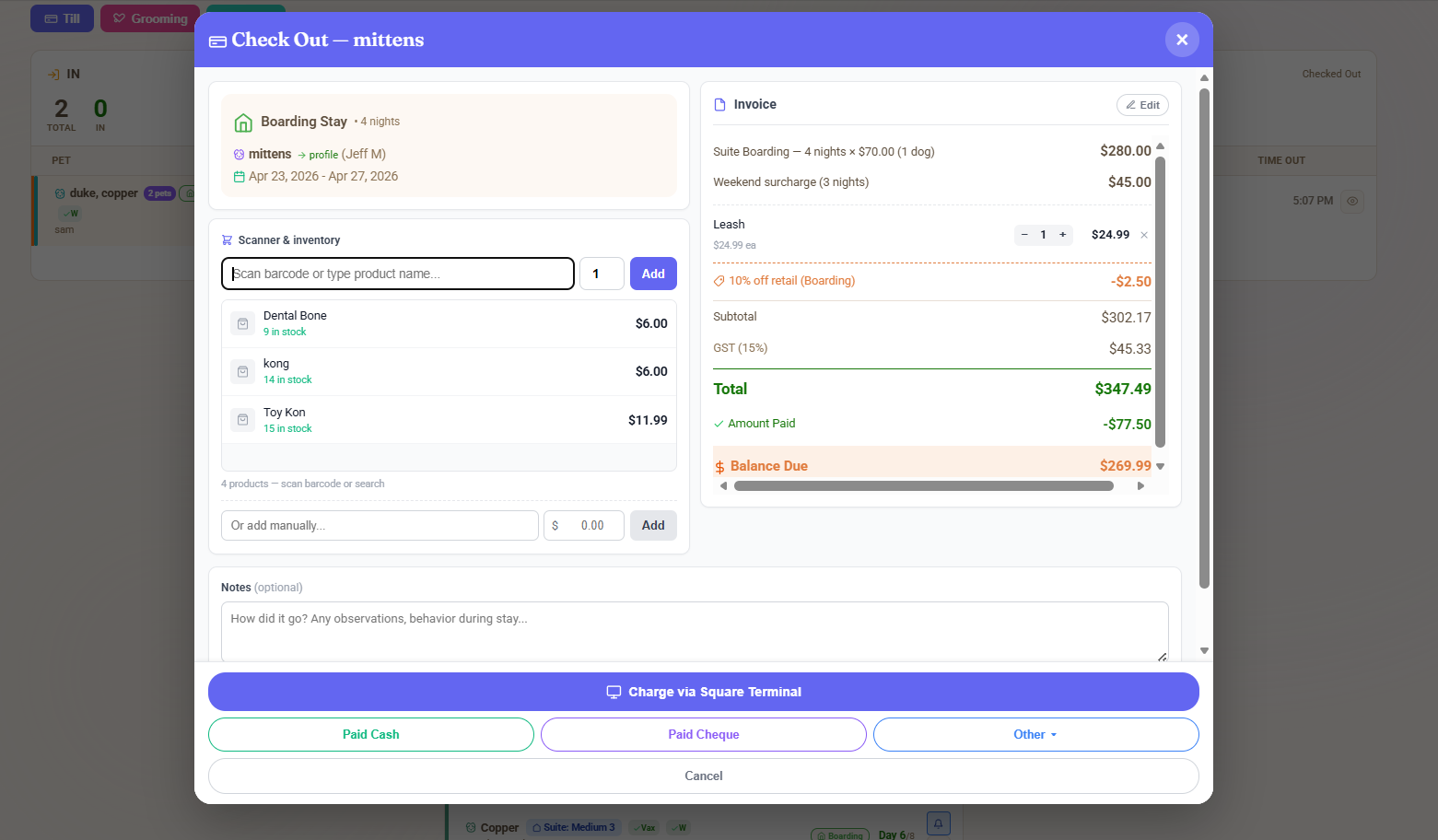
Scan the treats onto the booking’s invoice, add a discount if you want, and take one payment. Your stock count goes down, the tip goes to the right person, and the whole sale sits on the same invoice as the stay. Nobody has to ring it up again on another machine.
- Barcode scanning at checkout and a walk-in till for retail-only sales.
- Inventory counts that move when you sell. With Square, your item library and stock counts sync both ways.
- Tips recorded against the staff member who earned them, ready for payroll.
- Bundle, volume and staff discounts shown as their own lines, with tax worked out after the discount.
On a separate machine you’d ring the retail up twice, type the tip in by hand and fix the stock count later.
Why only Stripe and Square?
To keep a payment tied to a booking, the processor has to send information back to us. Most card machines can’t do that.
A payment can only sync if the processor offers the three things below. Stripe and Square do. Most bank terminals, countertop machines and payment apps don’t, or only offer them to very large partners.
- An authorised connection to your account. You approve BooknBuddy once, and it can start a charge on your account without ever holding your card data.
- A reference that travels with the charge. The booking and invoice go out with the payment, so the answer to “what was this for?” comes back with it.
- Webhooks. A signed message the processor sends the moment a payment succeeds, fails, is refunded or is disputed. Without it, the software only knows what somebody types in.
Even with Square, a sale rung up in the Square app outside BooknBuddy has no booking attached. Square knows $191.00 was paid; it has no way of knowing it was Luna’s stay.
Clover support is being evaluated.
Clover support is currently under evaluation. We are exploring eligible cash-discount and dual-pricing options that could help participating businesses offset card-processing costs while offering customers a clearly disclosed lower cash or supported bank-payment price. Availability, rates and payment methods will depend on the merchant’s country, processor approval and applicable rules.
United States, if it goes ahead
- A cash-discount or dual-pricing program for eligible merchants, with the card price and the lower cash price both shown.
- Zelle only for businesses whose own bank offers Zelle on their business account.
- Cash discounts, dual pricing and card surcharges follow different rules. Any program would follow the one that applies.
Canada
- No Canadian pricing is announced. Rules for card pricing differ by province, and Quebec may need separate treatment.
- Lower-price alternatives would refer to cash or Interac e-Transfer.
- A US setup would not be assumed to apply in Canada.
There is no Clover signup today. When it is available, this section will say so with the rates for each country.
Prices at a glance
Everything on one screen, in both currencies.
| Flex Pricing | Canada | United States |
|---|---|---|
| Starting price | $39.99 a month | $29.99 a month |
| Card fee 1.5% | on the first $4,000 a month | on the first US$3,000 |
| then 0.75% | $4,000 to $10,000 | US$3,000 to US$7,000 |
| then 0.5% | above $10,000 | above US$7,000 |
| Paid mostly another way: Solo | $39.99, up to $4,000 a month | $29.99, up to $3,000 |
| Pack | $79.99, to $10,000 | $59.99, to $7,000 |
| Pack Plus | $119.99, to $20,000 | $89.99, to $15,000 |
| Pro | $169.99, to $40,000 | $124.99, to $30,000 |
| Enterprise | $199.99, above $40,000 | $149.99, above $30,000 |
| Cash, cheques and bank transfers | Never a fee | Never a fee |
Questions
Still unsure? Email info@booknbuddy.com.
What is Flex Pricing?
You start at $39.99 CAD or $29.99 USD a month, with every feature. After each month ends, we price it on what happened. If at least half of your money that month went through our integrated processor (your connected Stripe or Square), you pay $39.99 plus a card fee on those payments. If most of it came in some other way, we price the month on your size instead, up to $199.99 CAD or $149.99 USD. After a quiet month you’re back at $39.99.
Is anything like this offered elsewhere in pet care?
Not that we know of. As of September 2026, Gingr, MoeGo, Paw Partner and PetExec all charge a set price for each plan, whatever kind of month you had.
Why does the price move?
A busy month puts a lot more bookings, reminders, texts and payments through our system, and that costs us more to run. A slow month costs us less, so we charge you less.
What happens during a slow or unusual month?
A slow month goes back to $39.99. An odd month, like one with a big cash job, is priced on its own and doesn’t affect the next one.
How is the half worked out?
When the month ends, we add up everything you recorded in BooknBuddy and how much of it went through our integrated processor. If that’s 50% or more, you pay $39.99 plus the card fee. If it’s less, we price the month on your size. Refunds, failed payments, voids and test payments don’t count. Your first month works the same as any other.
If a month is priced by size, do I pay the card fee as well?
No. Any card fees you already paid us that month come off the size price, so we only add the difference, and if your fees already cover it we add nothing. The difference goes on your next bill after the month ends. We never go back and re-bill an old month.
Will my price change without warning?
No. Your billing screen shows where you’re at as the month goes. And a month can never cost more than the size price for what you took in.
Does accepting cash, e-Transfer, Zelle or Venmo count against me?
No. You can take payments however you like, and we don’t charge a fee on any of those. They count towards what you took in that month. If most of your money comes in that way, we price the month on your size, and small shops stay at $39.99.
I am a big shop. Is there a better rate?
Yes, if you ask. If you’re a bigger shop or have more than one location and you run your payments through our integrated processor, we can agree a flat card rate with you. We’ll put it in writing and it starts the month after. Email info@booknbuddy.com and tell us roughly how much you take by card each month.
What happens to existing BooknBuddy customers?
You’re a Founding Member and your price isn’t changing. Flex Pricing is for businesses that sign up from October 1, 2026, and we won’t move you onto it. If you’d like to switch, ask us and we’ll go through it with you.
Can I keep my existing Stripe or Square account?
Yes. Connect the account you already have from Settings, Payments. Your agreement with them, your rates and your bank details stay the same, and your business stays the merchant on every payment.
Can customers pay deposits immediately?
Yes, when Stripe or Square is connected. You set the deposit as a percentage or a flat amount per service. The customer can pay it in the booking flow, or from the Pay Now link in the email we send them, and the booking shows the deposit as paid.
Can customers pay through the BooknBuddy app?
Yes. Outstanding balances show in the customer app and the desktop portal with a Pay button. Customers can save a card where your processor and settings allow it: saved cards are available on Square today, and on Stripe for shops we have switched the option on for.
What if I enter the payment directly in Square?
You can enter it in BooknBuddy by hand, and we don’t charge a card fee on it. Square only knows the amount, not which booking or invoice it was for, so someone has to find the invoice, enter the payment, split out any tip and check it at the end of the day.
Does Tap to Pay require separate hardware?
Not for eligible transactions. A compatible iPhone or Android phone running the BooknBuddy business app accepts contactless cards and supported digital wallets. Device model, operating system version, country and your processor account all have to qualify. Some payments, such as a chip-and-PIN card that cannot be tapped, still need a card reader or another method.
Is Clover available?
Not currently. Clover support is under evaluation and there is no date yet. We will say so here when that changes.
Who handles chargebacks and processor disputes?
Your processor. Because your business is the merchant, disputes go through Stripe or Square under your agreement with them, and any dispute fee is theirs. The booking, invoice, signed waiver and payment history in BooknBuddy are useful evidence when you respond.
When are funds deposited?
Stripe accounts are paid out weekly, every Friday, from day one, and move to daily payouts automatically after two consecutive months at $1,000 or more in card payments. Square accounts are paid out on Square’s own schedule, usually the next business day.
Are processor fees separate from the BooknBuddy card fee?
Yes. Stripe or Square charge their own fee under your agreement with them, and we don’t set it. Our card fee is separate and depends on how much you take by card that month: 1.5% on the first $4,000, 0.75% from $4,000 to $10,000, and 0.5% after that. For businesses billed in US dollars the lines are US$3,000 and US$7,000.
| Charge | Who sets it | How much |
|---|---|---|
| Processor fee | Stripe or Square, under your agreement with them | Their published rate. It varies by card type, country and how the card is taken. |
| BooknBuddy card fee | Us, published on this page | 1.5% on the first $4,000 a month (US$3,000) 0.75% from $4,000 to $10,000 (US$3,000 to US$7,000) 0.5% above $10,000 (US$7,000) |
Try it free for 30 days
Everything is included in the trial. Connect Stripe or Square and try a real deposit, a real pickup and a Tap to Pay sale before you decide.
Start Free TrialQuestions? info@booknbuddy.com