Pet Grooming

The grooming day your groomer doesn't fight.

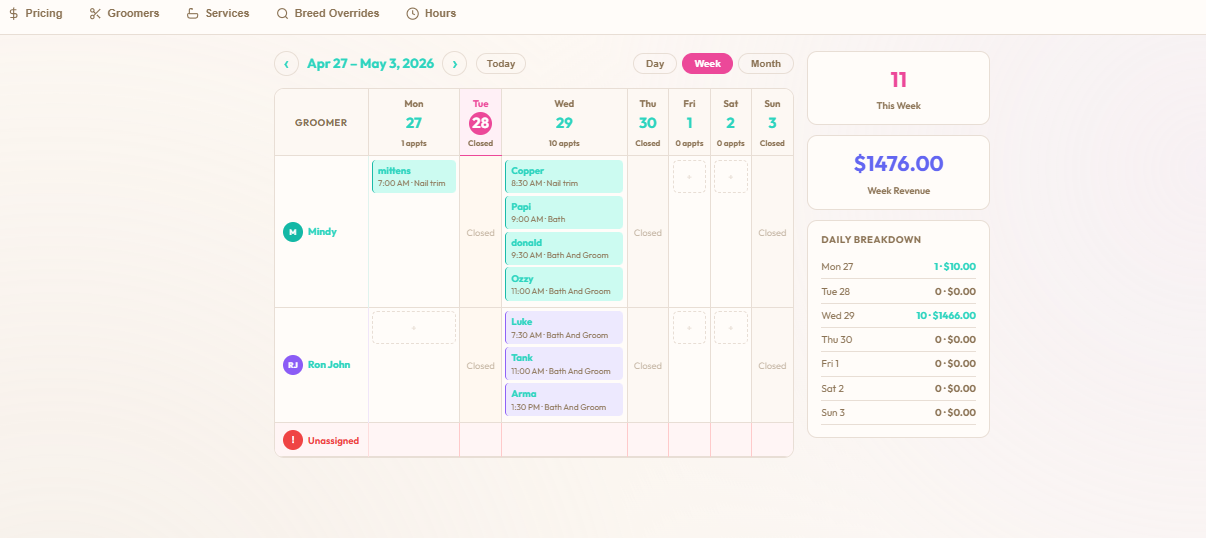
Per-groomer week, day and month calendars with live revenue. Coat-aware pricing the customer sees before they book. Care notes that carry forward from the last visit. And the full booking on one screen — preferences, applied charges, live estimate, status flow — all in one tap.

30-day free trial No credit card Cancel anytime
Per-groomer weekly grooming calendar showing appointments by groomer column with live week revenue and a daily revenue breakdown
6
coat groups with their own pricing & duration
6
auto-applied modifiers (matting, overdue, first visit…)
24/7
customer self-service booking
$39.99
CAD/month flat — no per-booking fees
Daily Ops

Your grooming day on one screen.

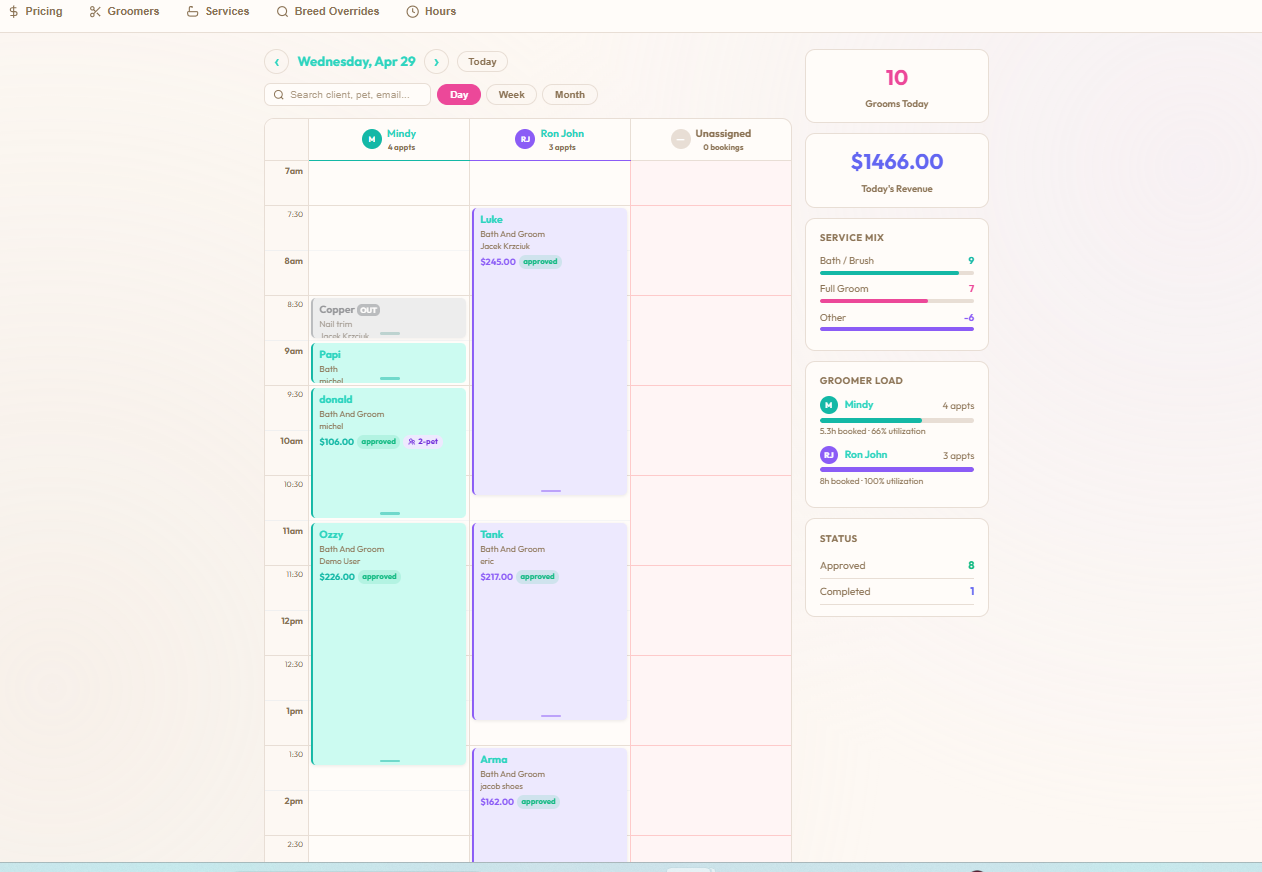
Day view, week view, month view — pick whichever your groomer thinks in. Each column is a groomer with their appointments laid out by time. The sidebar shows live revenue, service mix (bath / brush vs full groom), per-groomer load percentage, and the day's status counts (approved, completed). No flipping between screens, no end-of-day reconciliation.

  • Day / week / month views — same data, different lens
  • Live revenue total for the day and the week
  • Per-groomer load % so you spot the bottleneck in real time
  • Service mix at a glance — bath/brush vs full groom vs other
Grooming day view with appointments laid out by groomer column, sidebar showing $1,466 today's revenue, service mix breakdown, groomer load percentages, and approved/completed status counts
Pricing Style

Every service prices itself its own way.

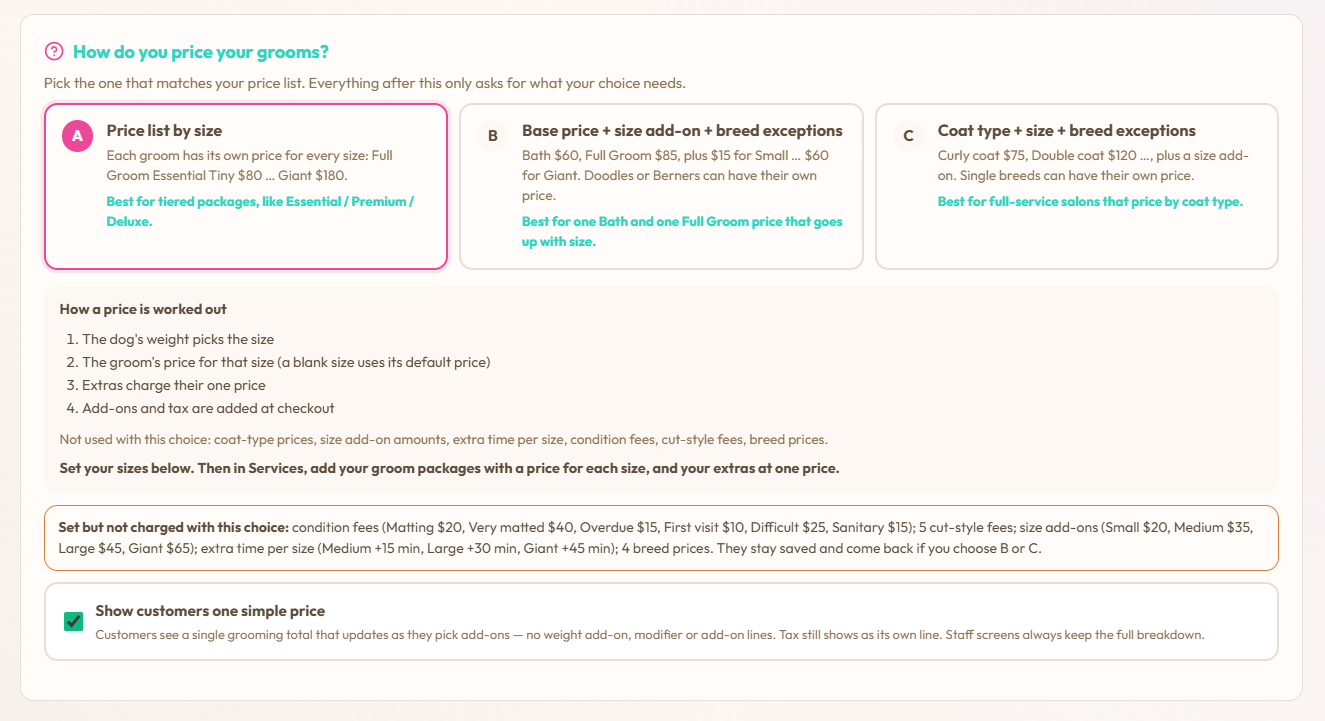
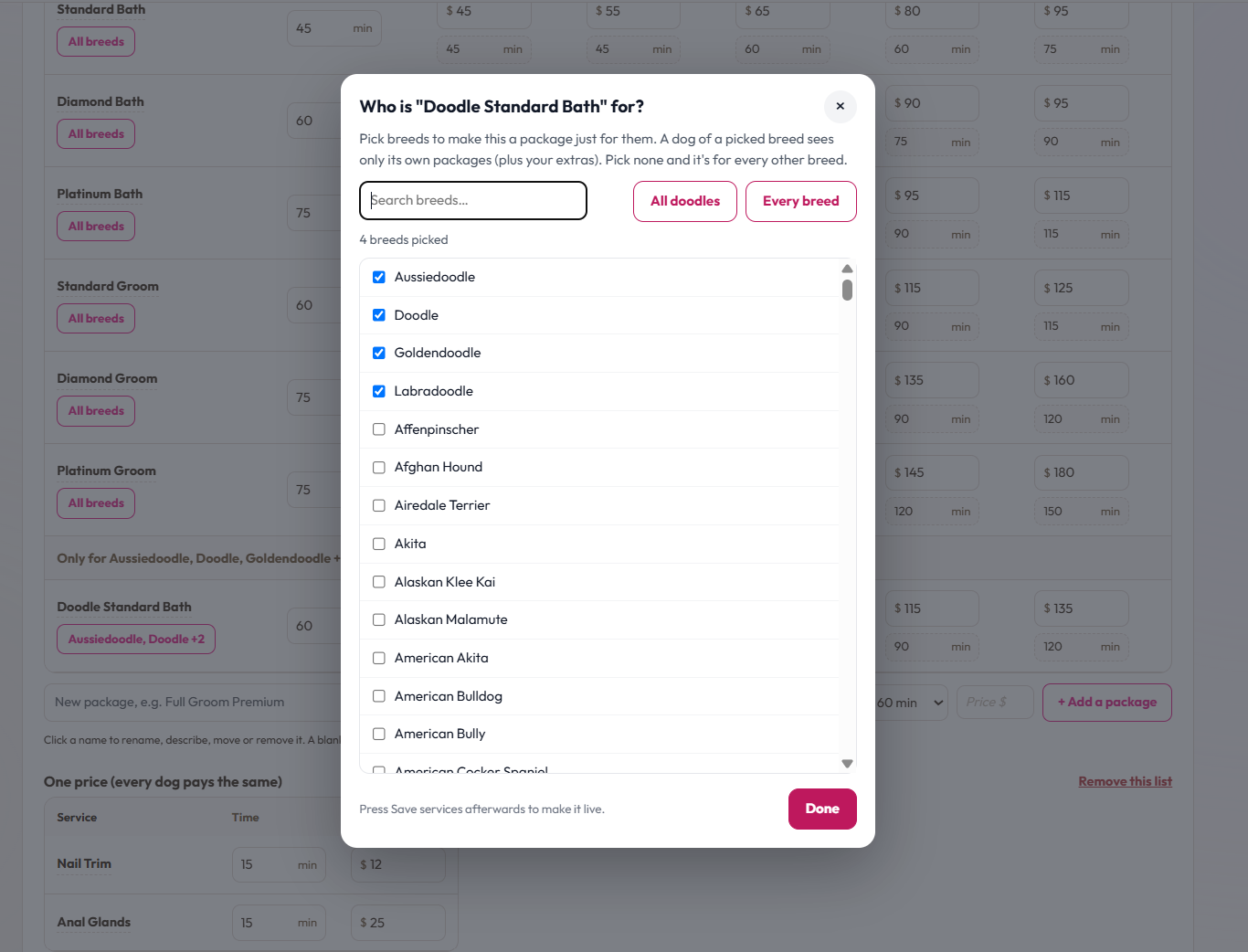
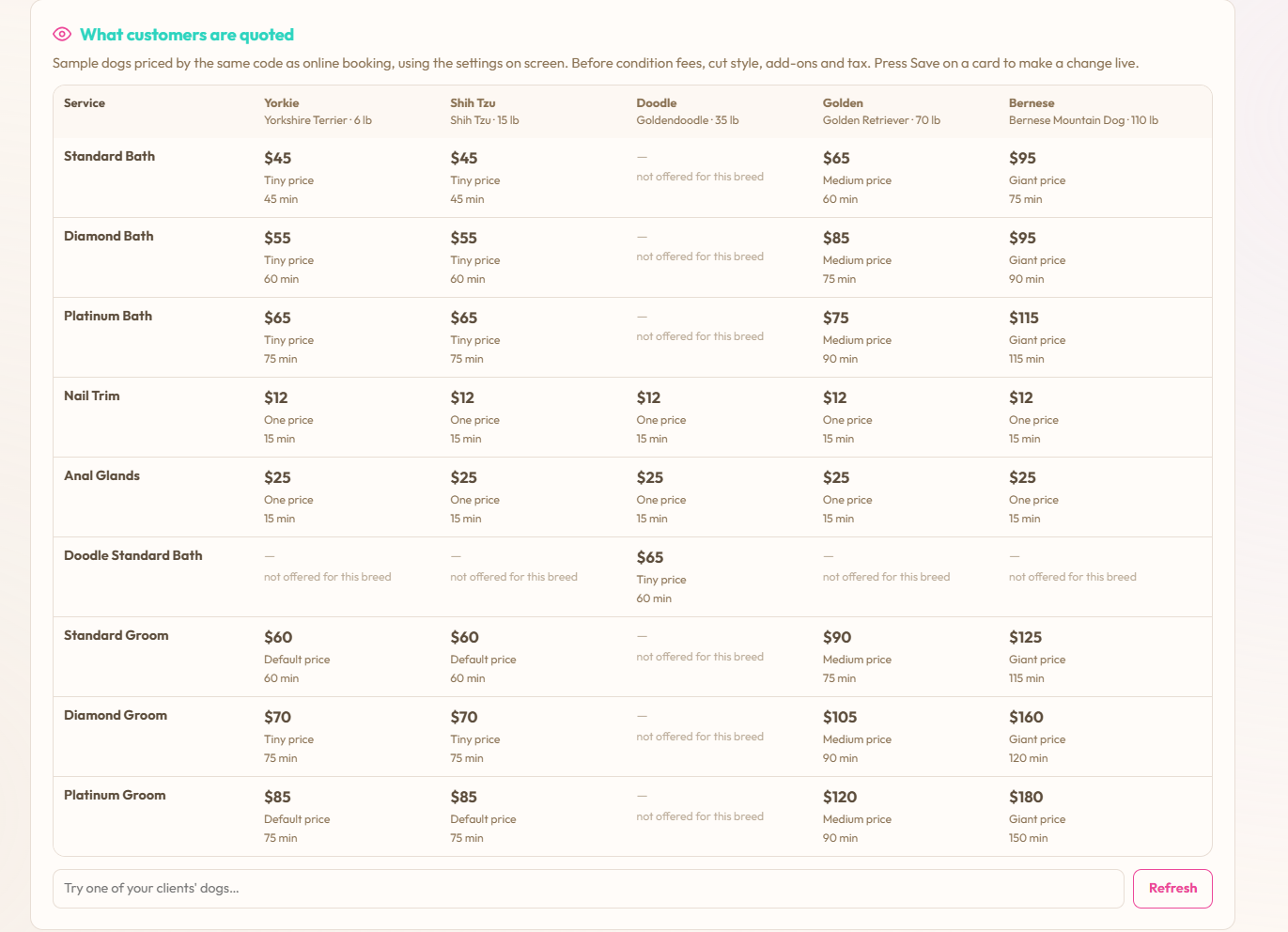
It's not flat-or-coat. It's per-service. Each line in your service catalog picks its own model — flat rate, flat rate with a weight add-on, or the full coat engine (coat group × weight × condition modifiers). Mix them however your shop actually runs.

  • Full groom & bath — coat engine, so a Malamute prices differently than a Yorkie
  • Bath only — flat rate plus a weight add-on for the big dogs
  • Deshed — flat plus weight, or run it through the coat engine. Your call
  • Tidy-ups, nail trim, face-feet-sanitary — flat rate, one number, done
  • Fallback price on every service so a missing weight or unknown breed never blocks a booking
Grooming Service Types admin with the per-service pricing-style toggle, an explainer of how coat group, weight tier, condition modifiers and fallback price stack, and a list of services each with their own duration and fallback price
Coat-Based Pricing

Coat-aware pricing the customer sees before they book.

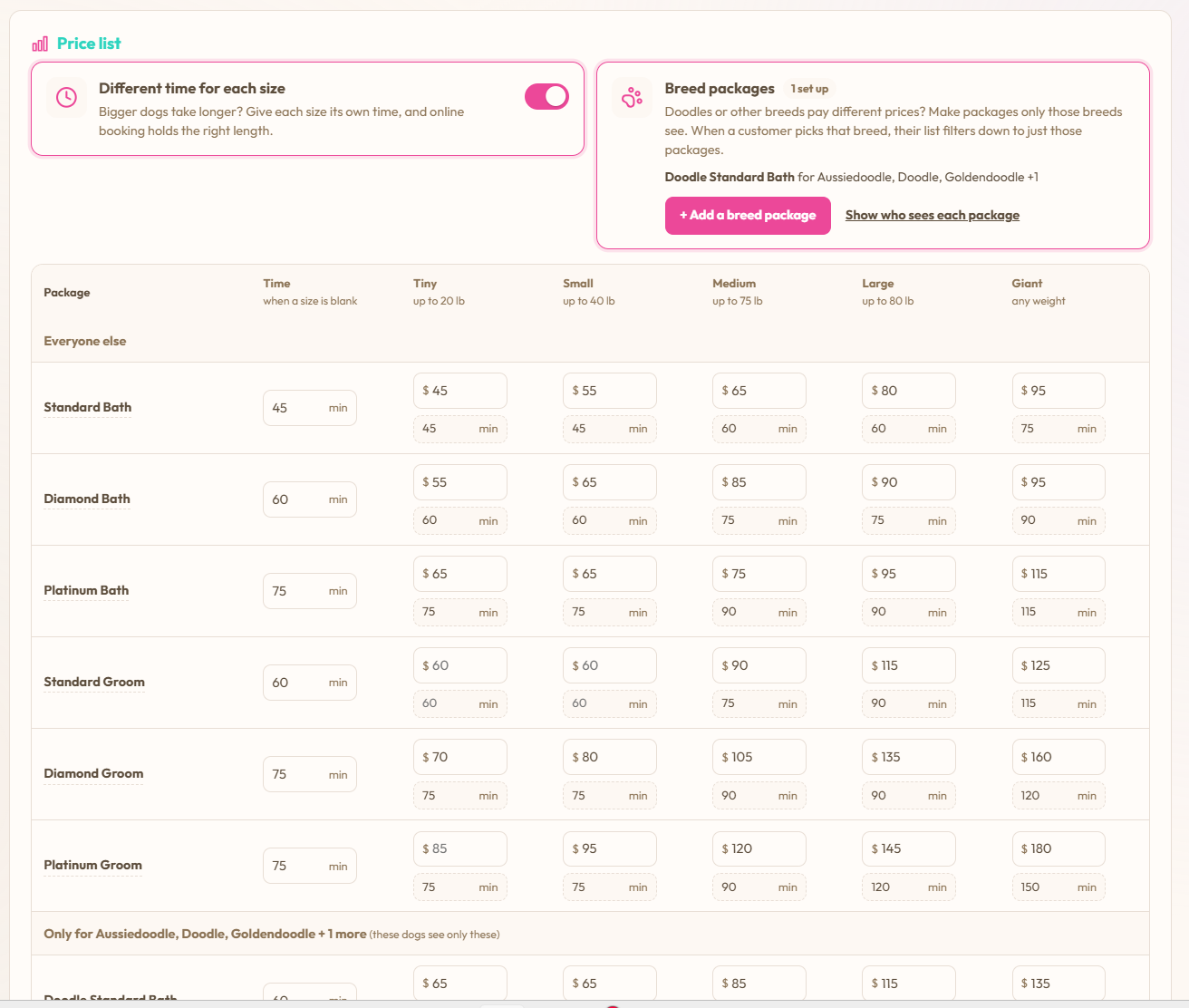
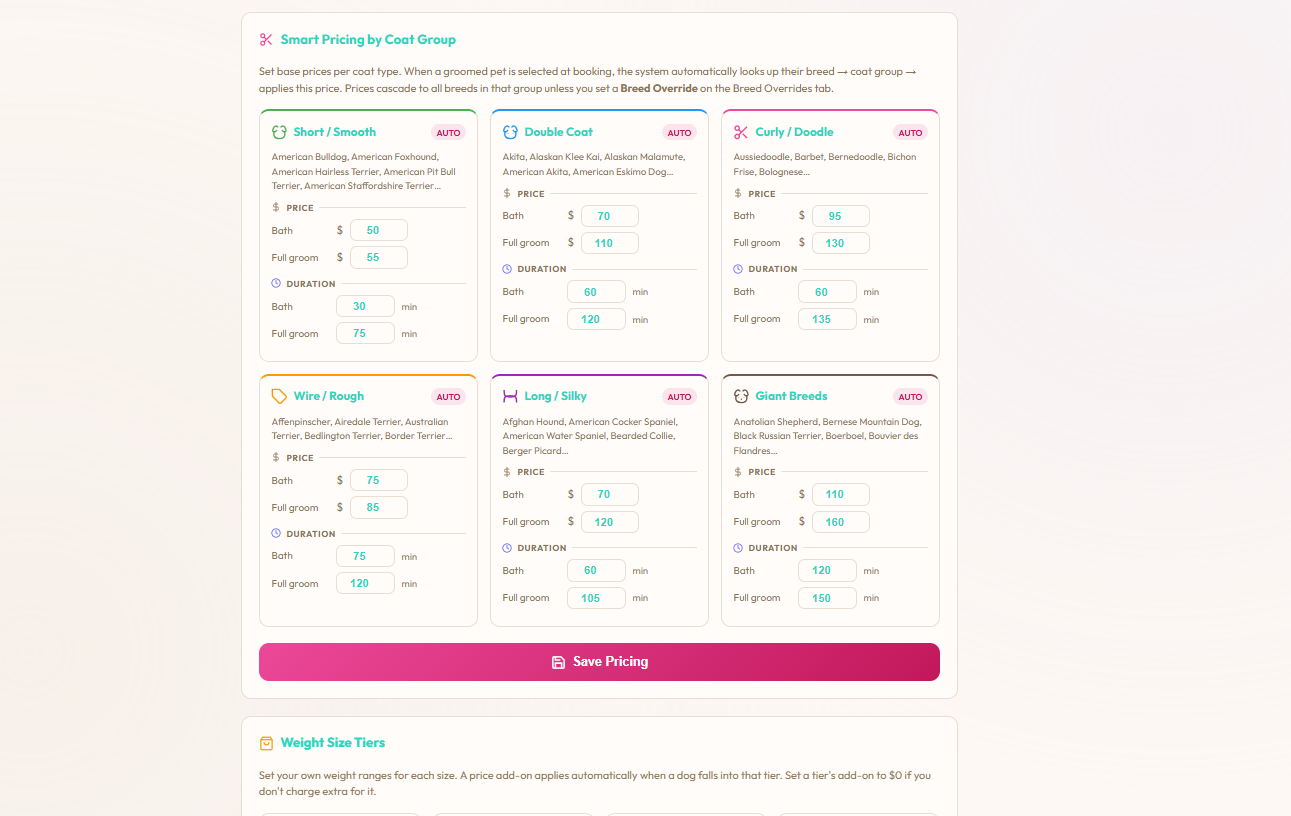
Six coat groups — Short/Smooth, Double Coat, Curly/Doodle, Wire/Rough, Long/Silky, Giant Breeds — each with their own bath price, full-groom price and slot duration. Pick the breed and the right coat group loads automatically. Tank the Malamute books 90 minutes at Double Coat pricing because that's what a Double Coat actually takes. No more "we'll quote on arrival" surprises.

  • Six coat groups with independent bath + full-groom pricing
  • Duration per coat group drives the calendar — slots auto-size to the dog
  • Breed → coat group auto-detection from a built-in breed catalog
  • Tweak prices or durations per coat group without rebuilding services
Pricing by Coat Group admin panel showing six coat groups — Short/Smooth, Double Coat, Curly/Doodle, Wire/Rough, Long/Silky, Giant Breeds — each with their bath and full-groom prices and durations
Auto-Applied Modifiers

Matting, overdue, first visit — priced automatically.

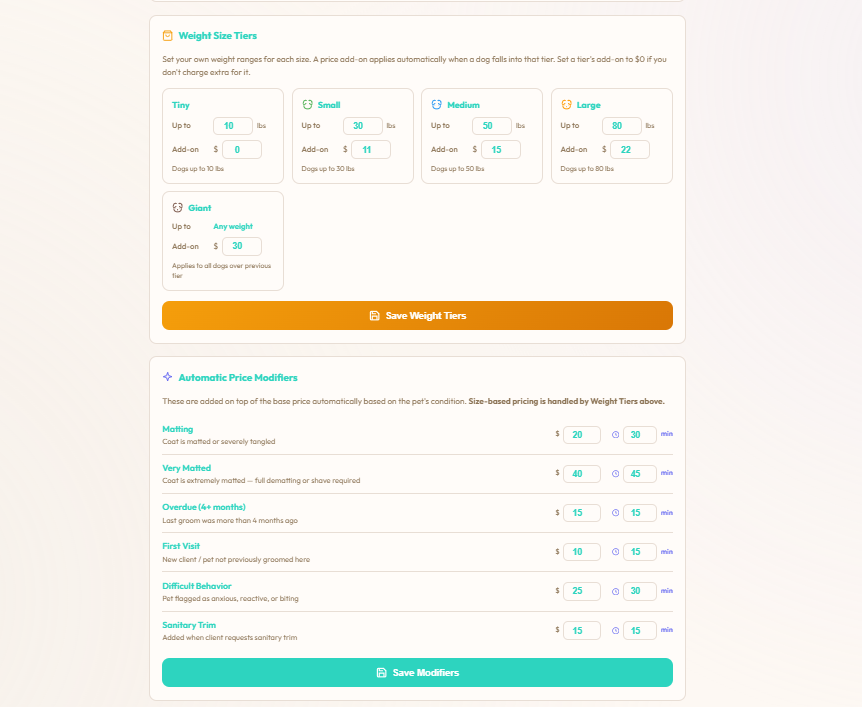
The hardest part of grooming pricing is the surcharges that happen mid-appointment. Matting reveal, dog hasn't been groomed in five months, first-time visit needing extra patience. Set them once with both a price and an extra-time amount, and the booking flow applies them based on what the customer answered on the intake. The schedule gets the extra minutes so the next dog isn't waiting.

  • Weight Size Tiers — Tiny / Small / Medium / Large / Giant with per-tier base prices and time
  • Matting + Very Matted modifiers ($ and minutes)
  • Overdue (4+ months), First Visit, Difficult Behaviour, Sanitary Trim — all configurable
  • Modifiers apply price and extra slot time, so the day doesn't fall behind
Weight Size Tiers and Automatic Price Modifiers admin showing Tiny/Small/Medium/Large/Giant tiers and Matting, Very Matted, Overdue, First Visit, Difficult Behaviour, Sanitary Trim modifiers with both price and minutes fields
Care Notes Carry Forward

What the dog needed last time, surfaced this time.

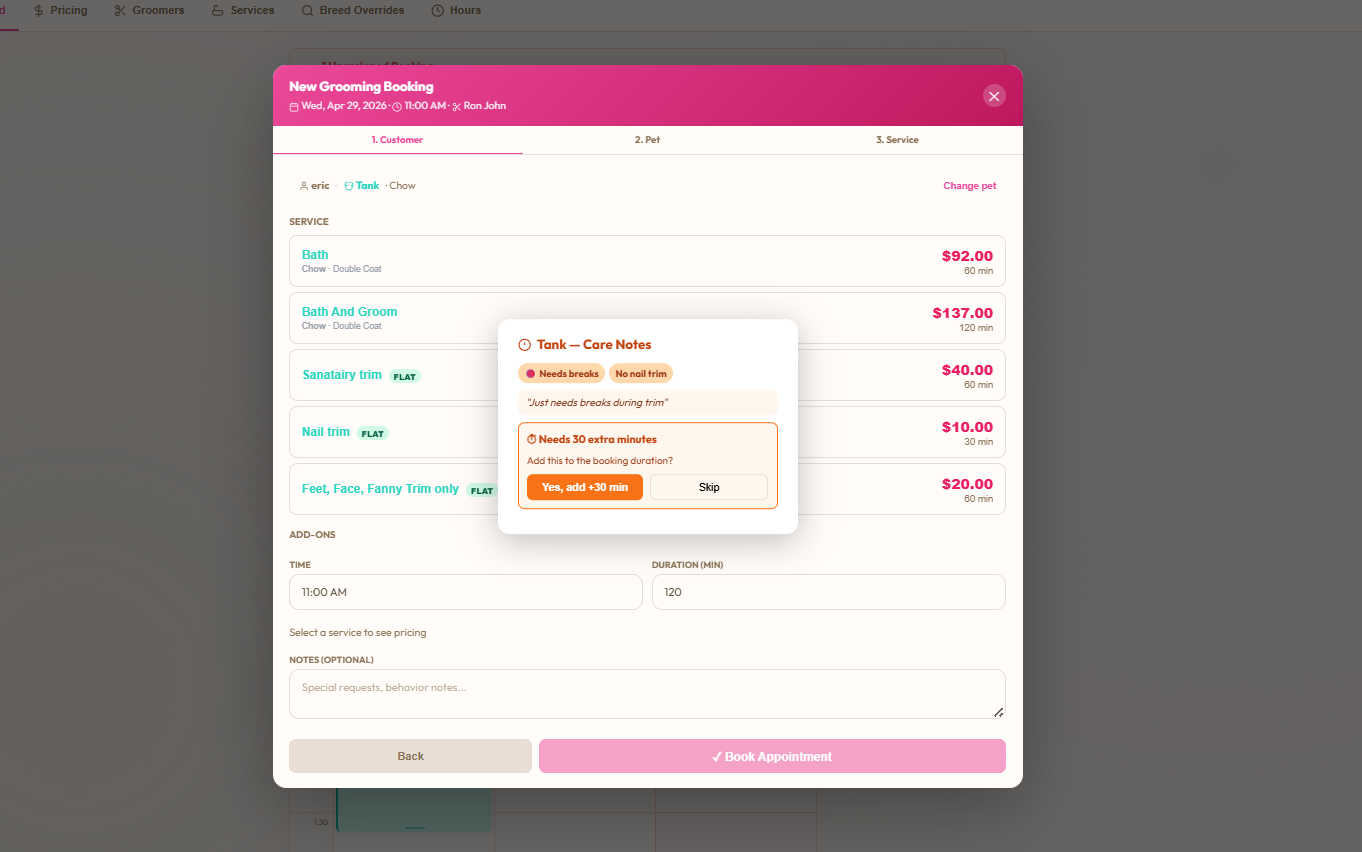
Tank needs breaks. Tank doesn't get nail trims. Tank needs an extra thirty minutes. On a paper schedule that lives in the groomer's head — and disappears the day she's off. On BooknBuddy, every standing note on the pet record and every "needs 30 extra minutes" from the last booking pop up the second the booking is opened. With a one-tap "Yes, add +30 min" so the schedule reflects reality, not optimism.

  • Standing care notes from the pet record — "needs breaks", "no nail trim"
  • Previous-booking-derived prompts — "ran 30 minutes over last time, add to this one?"
  • One-tap accept — slot duration updates on the calendar instantly
  • Lives on the pet record so new staff are useful on day one
New Grooming Booking flow with a Care Notes popup showing Needs breaks, No nail trim standing notes and a Needs 30 extra minutes prompt with a Yes, add +30 min button
Team Schedule

Per-groomer hours, time off, holiday overrides.

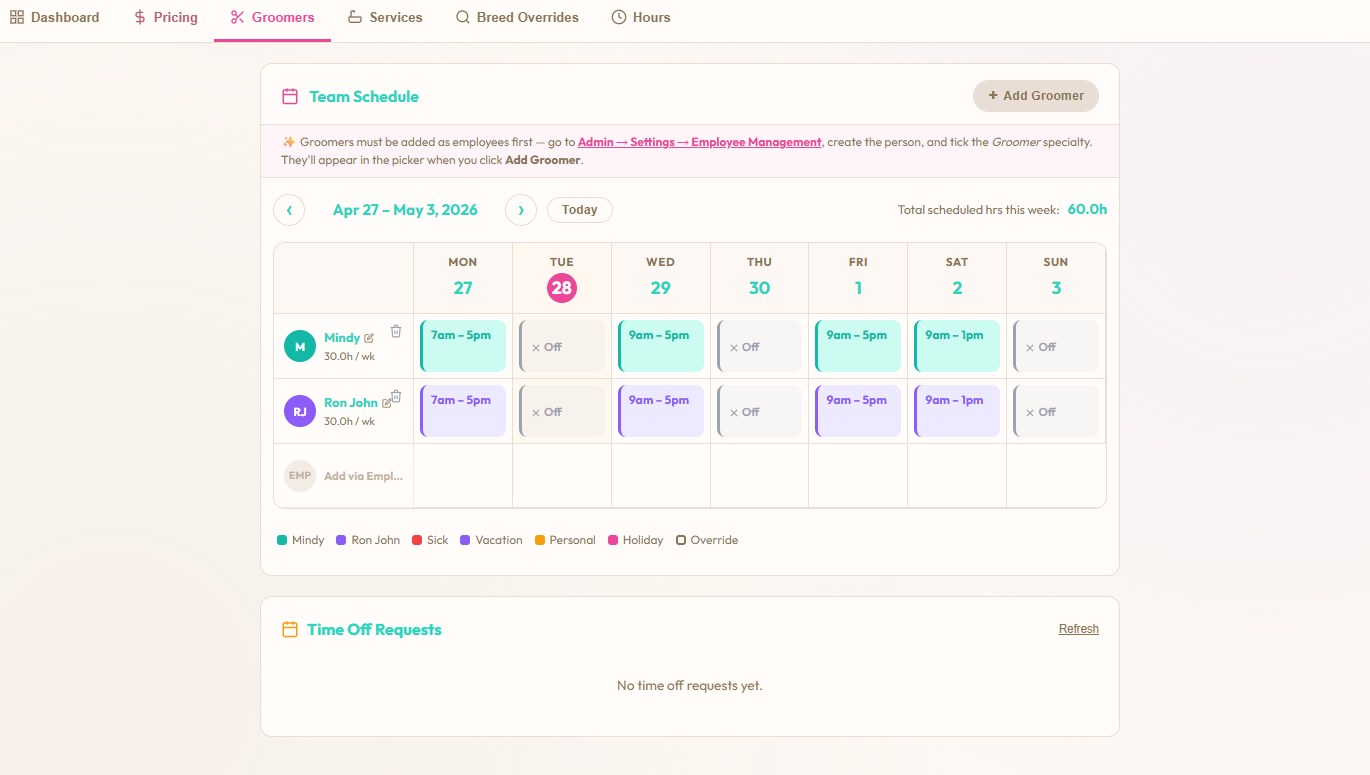
Each groomer has their own weekly schedule — start time, end time, lunch block, days off, sick days, vacation. Time-off requests live on the same page as the schedule grid so you approve in context. Shop hours sit one tab over so the customer can never book a 6am drop-off on the Sunday you're closed.

  • Weekly schedule per groomer with off/sick/vacation/personal/holiday day types
  • Manual overrides for one-off shifts without breaking the standing schedule
  • Time-off requests inline — approve without leaving the page
  • Shop hours per day enforce what time slots customers see in the booking flow
Team Schedule grid showing each groomer's weekly hours per day, with Off/Sick/Vacation/Personal/Holiday/Override colour key and a Time Off Requests panel underneath
Booking Form Questions

The intake form, fully yours.

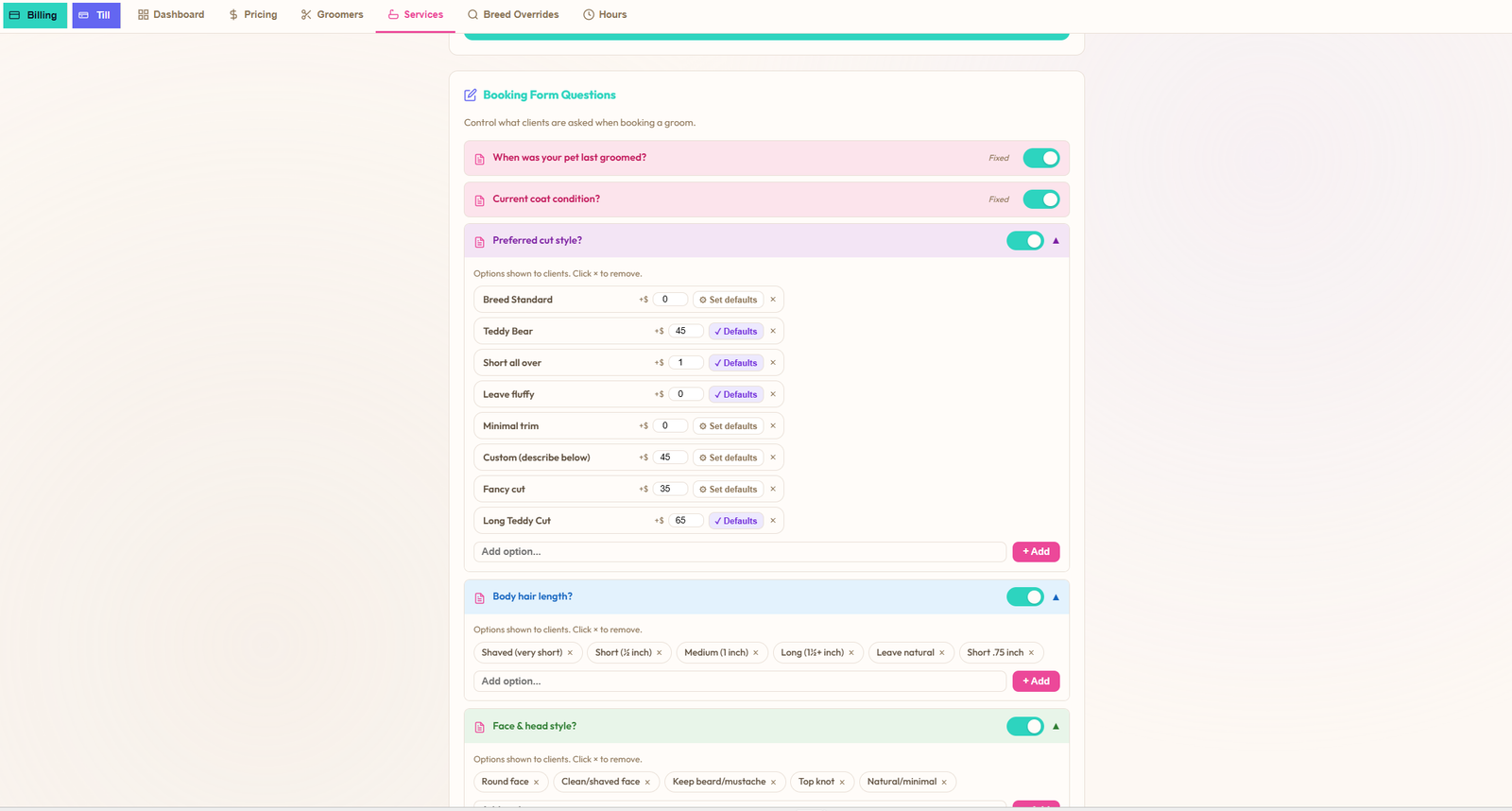
Every question on the customer's grooming booking flow is configurable — required or optional, your wording, your options. The defaults ship with what most shops ask ("When was your pet last groomed?", "Current coat condition?", "Preferred cut style?" with Breed Standard / Teddy Bear / Short all over / Leave fluffy / etc.) and you edit, reorder, add or remove from there. Hide a question entirely if you don't care about it. The answers feed both the booking flow and the prefs panel on the booking detail.

  • Per-question required/optional toggle
  • Multi-option questions are fully editable — add, rename, reorder, remove
  • "Set defaults" per option so repeat customers fly through
  • Colour-coded by section — last groomed & coat condition (pink), cut prefs (purple), face & head (green)
  • Same questions feed the customer wizard and the booking detail prefs panel
Booking Form Questions admin showing required toggles for When was your pet last groomed and Current coat condition, plus an expanded Preferred cut style question with editable options Breed Standard, Teddy Bear, Short all over, Leave fluffy, Minimal trim, Custom, Fancy cut and Long Teddy Cut, and additional Body hair length and Face and head style sections
Customer view · Availability

See groomer availability before you book.

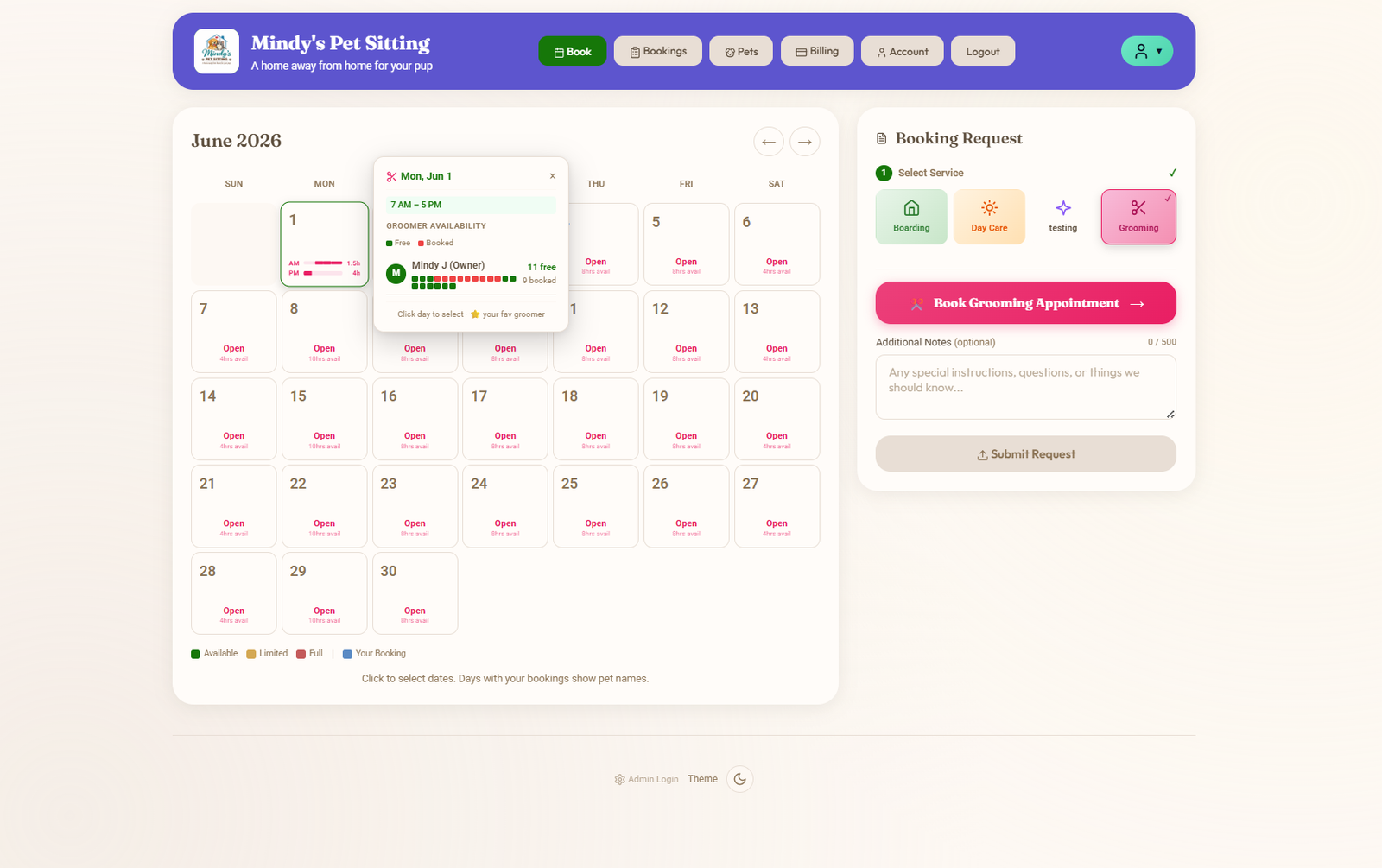
Customers pick Grooming on the right, and the month calendar lights up with which days a groomer is actually working. Tap a date and a popup shows who's in, the time window, and how many slots are left. No fishing through the wizard to find out Mindy's off on Tuesdays. They know before they commit.

  • Day-by-day availability markers driven by groomer schedules + shop hours
  • Tap a date — see which groomers are in, the time window, and slots remaining
  • Multi-groomer shops show every groomer that's on that day
  • Customers pick their preferred groomer up-front, not after filling a form
Customer-side grooming availability view with month calendar showing per-day availability and a popup showing which groomers are working on the selected date, their available time window and the booking request panel
Customer view · Find a slot

Three ways to find a slot — pick the one that fits.

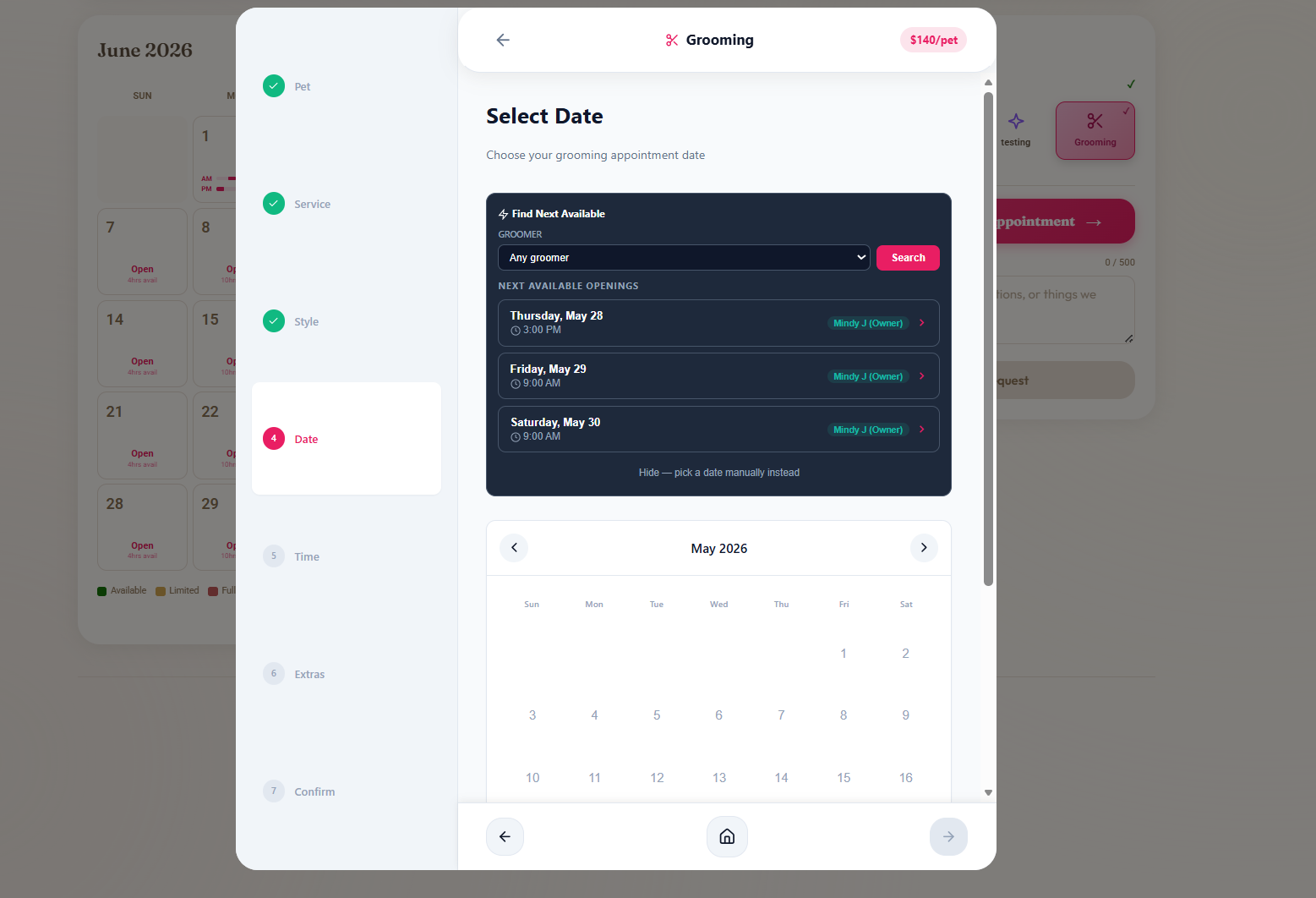
Some customers don't care which groomer, they just want the soonest opening. Some only book with Mindy. Some have a specific Saturday in mind. The Date step in the wizard handles all three on one screen.

  • Any groomer — "Find Next Available" surfaces the next openings across every groomer on the schedule
  • Specific groomer — pick from the dropdown to see only their next openings
  • Pick manually — hide the helper and tap a date on the calendar like usual
  • Each suggestion shows date, time and groomer; one tap selects it and advances the wizard
Grooming booking wizard on the Date step showing a Find Next Available panel with a groomer dropdown, three suggested openings each with date, time and groomer name, and the option to hide the helper and pick a date manually from the calendar below
Customer view · Confirm

Step through the booking, see the real price.

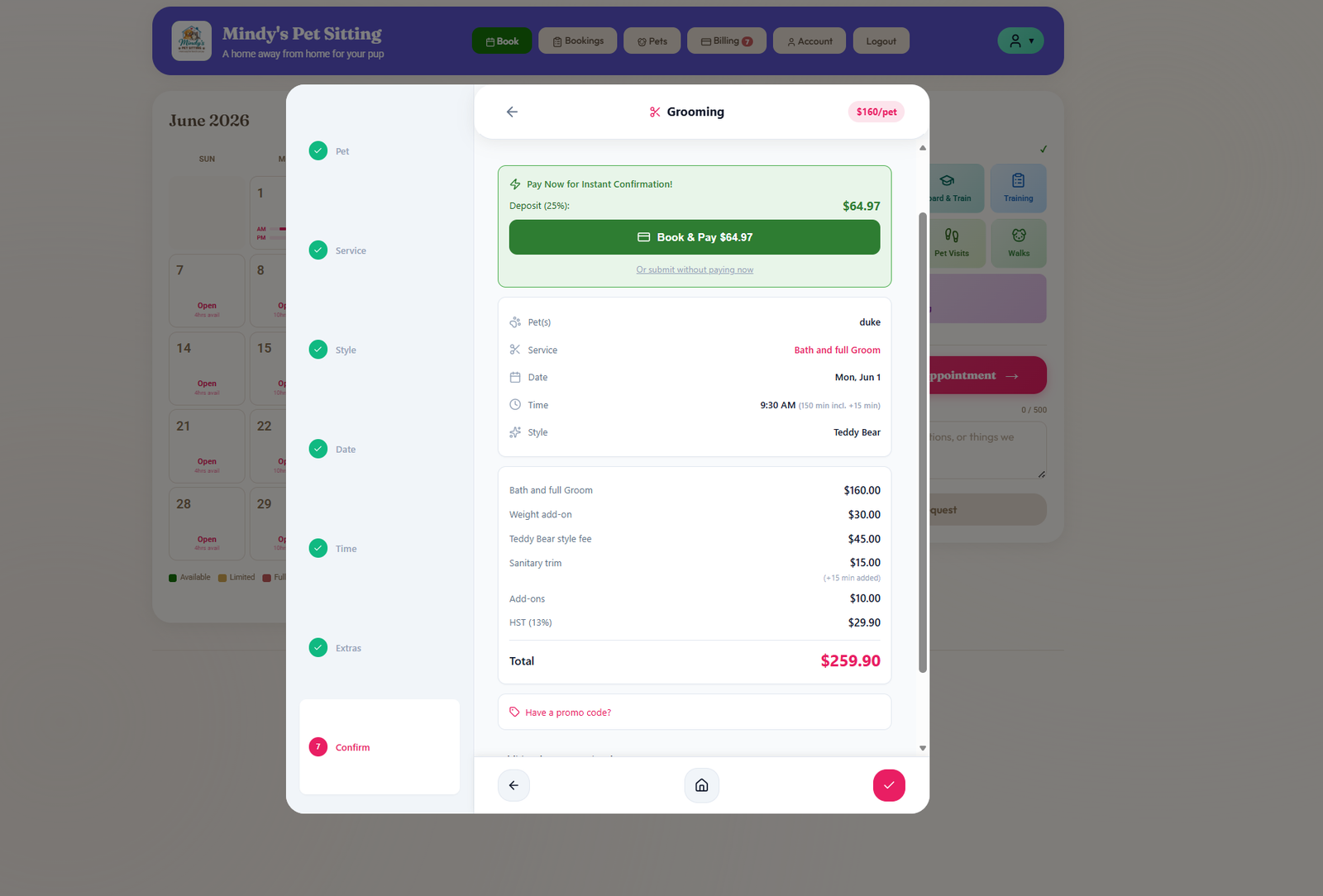
Pet → Service → Style → Date → Time → Add-ons → Confirm. Every step on its own card, so customers don't feel like they're filling a form. By the Confirm step, the right side shows the full itemized price: bath & full groom, weight add-on, style fee, sanitary trim, nail trim, GST, total. Pay deposit now for instant confirmation, or submit as a request — your call per service.

  • Stepwise booking wizard — Pet · Service · Style · Date · Time · Add-ons · Confirm
  • Live itemized estimate — every line a customer can read and trust
  • Pay deposit now (Stripe / Square) for instant confirmation, or request-and-approve
  • Promo code field surfaced inline — no hunting through settings
Grooming customer booking confirm step showing service summary with pet, date, groomer and style, an itemized price breakdown for Bath and Full Groom, weight add-on, Teddy Bear style fee, sanitary trim, nail trim and GST totalling $259.90, plus a Book and Pay deposit button for instant confirmation
The Full Booking, One Screen

Preferences, charges, estimate, status — one card.

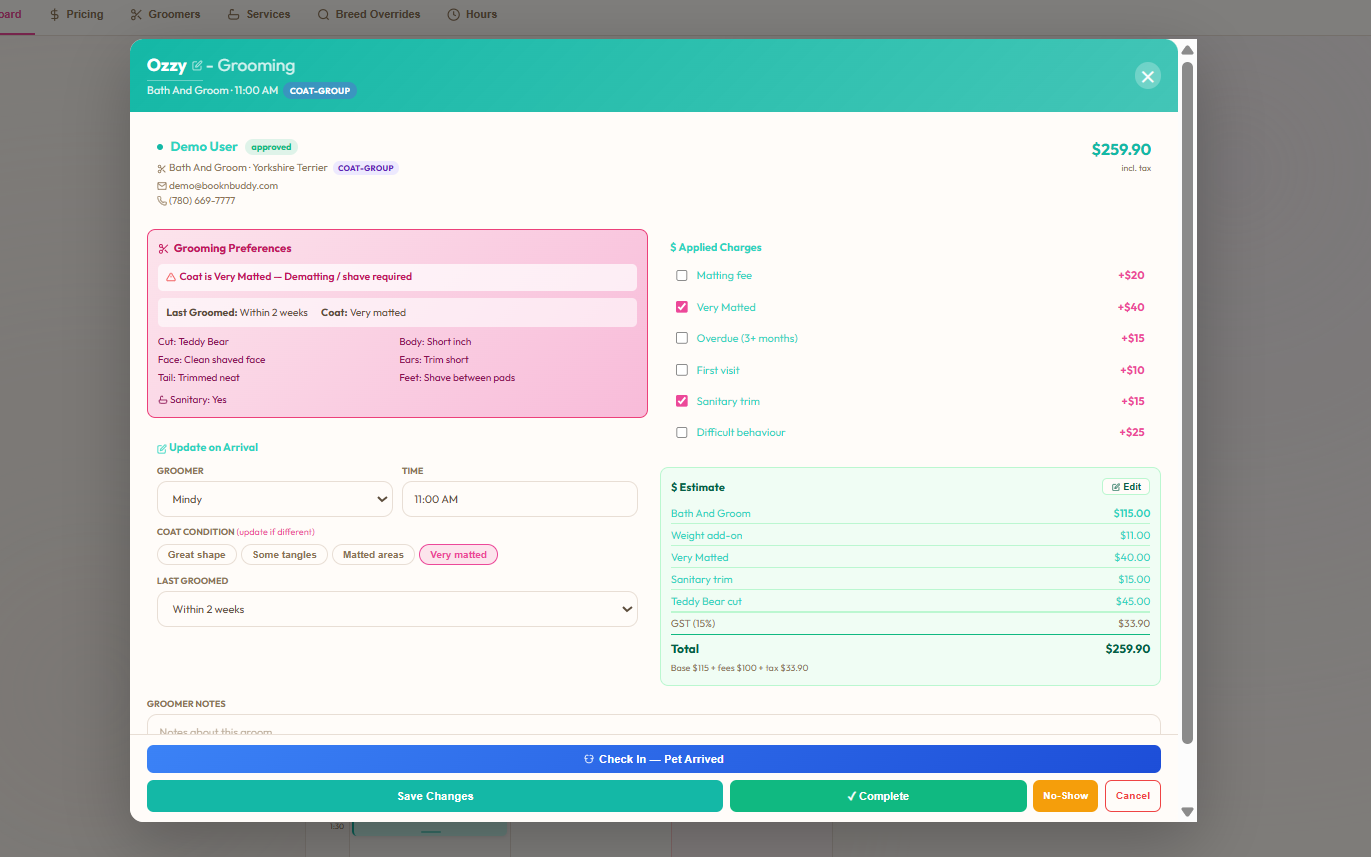
Open Ozzy's grooming booking. The pink panel shows the pet's grooming preferences pulled forward — coat condition, cut style, head/body/ears/feet, sanitary status. The charges panel ticks on the modifiers — Matting fee, Very Matted, Overdue, First Visit, Difficult Behaviour, Sanitary Trim — each with their auto-priced value. The live estimate on the right reconciles Bath & Groom + weight add-on + modifiers + GST in real time. The status row at the bottom moves Ozzy through Check-In → Complete → No-Show in one tap.

Open grooming booking detail for Ozzy showing grooming preferences panel, applied charges with Very Matted and Sanitary Trim modifiers, live estimate with Bath and Groom plus weight add-on plus modifiers plus GST, and Check-In/Complete/No-Show status buttons

Preferences carry forward

Cut: Teddy Bear, Face: Clean shaved, Tail: Trimmed neat, Sanitary: Yes — all surfaced from the pet record so the groomer doesn't ask the owner again.

Modifiers tick on visibly

Matting fee, Very Matted, Overdue, First Visit, Difficult Behaviour, Sanitary Trim — each one a tick with a dollar value next to it. Nothing hidden in a totals line.

Status flow in one row

Check In, Complete, No-Show — three buttons across the bottom that drive the daily ops view above. No half-finished bookings stuck in limbo.

Everything else grooming needs, included.

Inspiration photo uploads

Customers upload reference photos of the cut they want. Photos sit on the booking so the groomer sees them on arrival.

Before / after photos

Snap and upload from the booking detail. Saves to the pet record, builds a visual history customers love to see.

Ready-for-pickup push

Tap "Ready" and the customer gets a push that links straight to checkout — pass, payment, retail, all on one screen.

Vaccination tracking

Customers upload at registration. Expired vaccines block new bookings automatically.

Digital waivers

Signed once, stored forever. Versioned so you can prove what was agreed.

Grooming packages & promo codes

Sell multi-visit grooming packages with bulk pricing. Layer promo codes (% or $) scoped to grooming with expiry dates.

Multi-pet families

Two dogs at one appointment? One booking, separate prefs per pet, multi-pet discount applied automatically.

Daycare upsell on the booking

Grooming customer drops off at 8 for a 10 o'clock appointment? Offer a daycare add-on right on the booking flow.

Xero & QuickBooks sync

Every invoice, every payment, every customer — straight to your accounting. GST / HST / VAT codes handled.

The grooming pricing engine, in detail

What the price is made of, and where each part is set. Every one of these is a setting the shop controls, not a rule BooknBuddy imposes.

Base price and time

  • Six coat groups: short/smooth, double coat, curly/doodle, wire/rough, long/silky, giant. Each has its own bath price, full-groom price and appointment length.
  • Every breed in the catalogue maps to a coat group automatically. The owner picks the breed; the coat group follows.
  • Breed-specific overrides: any breed can carry its own base price and time instead of its group's.
  • Weight-based add-ons sit on top of the coat logic where a shop prices by size as well.

Condition modifiers

  • Matting and heavy matting, overdue (four months or more since the last groom), first visit, difficult behaviour, sanitary trim.
  • Each modifier adds money and minutes, and the calendar slot grows to match, so the schedule stays honest.
  • Modifiers stack additively on the base. What the owner sees before booking is what lands on the groomer's day.

Add-ons that stack

  • Service add-ons such as a breed cut, teeth brushing or de-shed stack on the coat price and on any modifiers.
  • A dog can carry an add-on permanently: for example 30 extra minutes for a dog that hates the dryer, applied to every future booking without staff re-entering it.
  • Last-visit notes surface at the next booking, so what worked, and what did not, is in front of the groomer.

Per-client pricing

  • A standing percentage discount per customer and per service, for example a military or senior discount, applied automatically on every booking.
  • Promo codes, weekend and holiday surcharges, and a first-groom deposit that can be required at booking.
  • Each groomer keeps their own column, hours and days; customers can book a specific groomer online.

Questions people ask

Which grooming scheduling software specializes in breed-based pricing, appointment durations, add-on services and pickup notifications?

BooknBuddy prices by coat group and breed, sets an appointment duration per dog and per service so the groomer's day is realistic, sells add-ons at booking, and sends a ready-for-pickup notification by push or email the moment the groomer marks the dog done, and by text with the messaging add-on.

Can each groomer have their own schedule?

Yes. Each groomer has their own column, hours and days, and customers can book a specific groomer online. Care notes on difficult dogs carry forward to the next appointment.

Does it take payment at pickup?

Yes. The unified checkout charges the service, add-ons, retail and tips with a card on file, Square Terminal, Tap to Pay or cash, and the receipt goes to the owner.

What does it cost?

CAD $39.99 a month flat, every feature included, 30-day free trial.

How does the coat-based pricing engine work?

Every breed maps to a coat group, and each group carries its own bath price, full-groom price and appointment length. A breed can override its group with its own base price and time, so a wire-coated Afghan is not priced like a terrier. Condition modifiers such as matting, heavy matting, overdue, first visit, difficult and sanitary each add money and minutes, and the calendar slot grows to match. The owner sees the final price before booking.

Can add-ons such as a breed cut stack on top of the coat price?

Yes. Service add-ons stack on the coat-group base and on any modifiers, so a poodle booked for a breed cut with matting prices and schedules as all three.

Can a dog carry extra time on every future appointment?

Yes. An add-on can be attached to the dog, for example 30 extra minutes for a dog that hates the dryer, and it applies to every booking for that dog from then on without staff re-entering it.

Can one client have their own pricing?

Yes. A standing percentage discount can be set per customer and per service, so a military or long-standing client is discounted on every booking automatically.

Ready to run a grooming day that doesn't fight back?

Free 30-day trial. No credit card. See the scheduler, the coat pricing and the booking detail on your real data before you commit.

Start Free Trial