Flex Service

Run a service nobody else's software has heard of.

Every other pet care platform locks you into their fixed menu — boarding, daycare, grooming, training, walking. If your business does something else — wellness consults, therapy visits, behaviour assessments, pet photography — you're shoehorning it into the wrong category. Flex Service is the answer: build your own service from scratch, name it whatever you call it, configure your own sessions, formats and intake forms. Everything else — payments, waivers, vaccines, customer cards, messaging — just works.

30-day free trial No credit card Cancel anytime
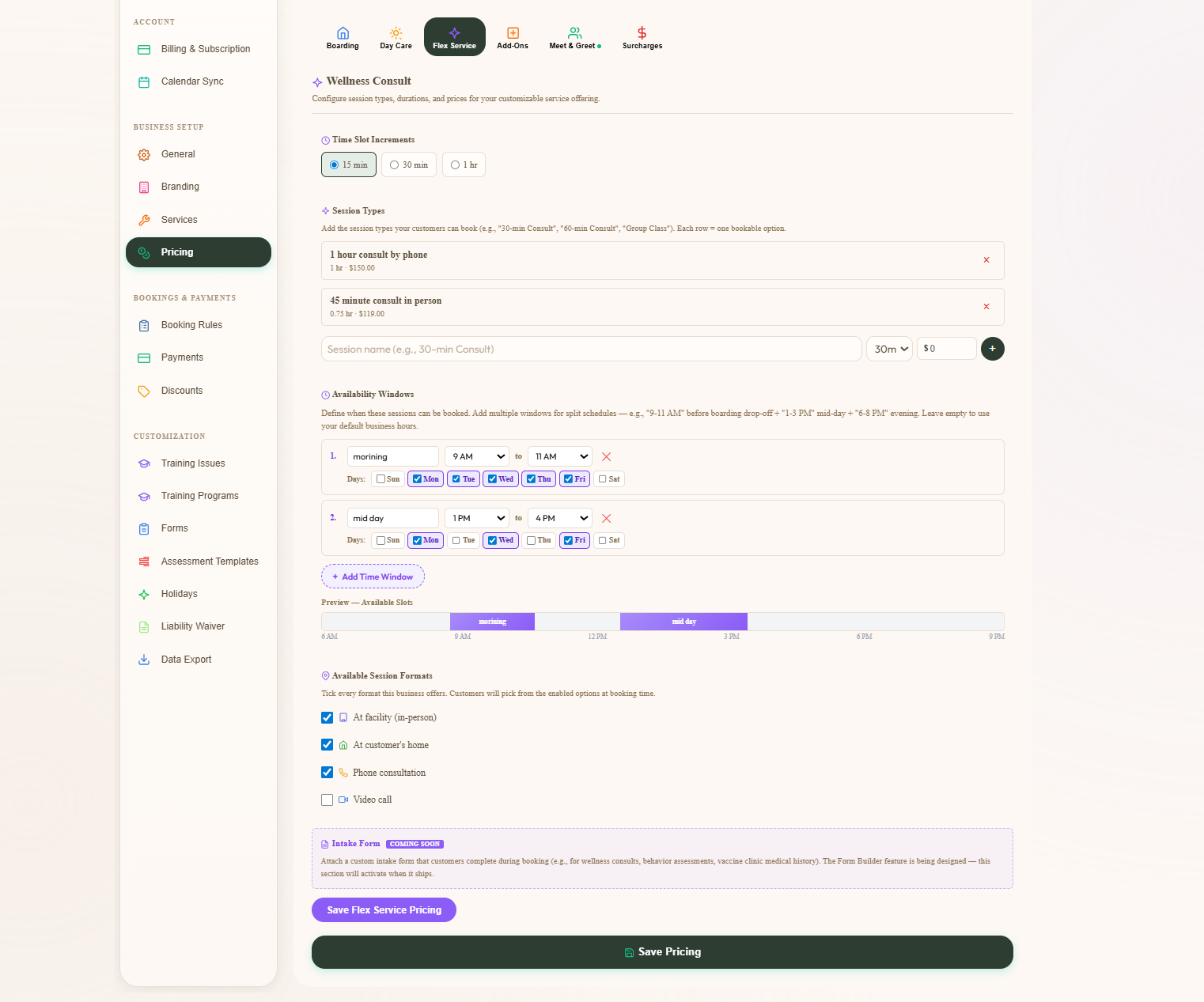
Admin Pricing tab for a Flex Service renamed Wellness Consult — session types list, available formats checkboxes for in-facility / in-customer's home / phone consultation, time-window cards with day-of-week pills, Save Flex Service Pricing button
Services we've seen built on Flex
Wellness Consult Behaviour Assessment Therapy Visit Pet Photography Session Mobile Vet-Tech Visit Animal Communication Vaccination Clinic DNA / Wellness Test Day Pet Reiki / Massage Pet Transport / Relocation
Build it
a service that fits your actual business
4
location formats — facility, home, phone, video
Custom
intake forms wired into the booking flow
$39.99
CAD/month flat — same as every other service
Service Display Names

Name it whatever you call it.

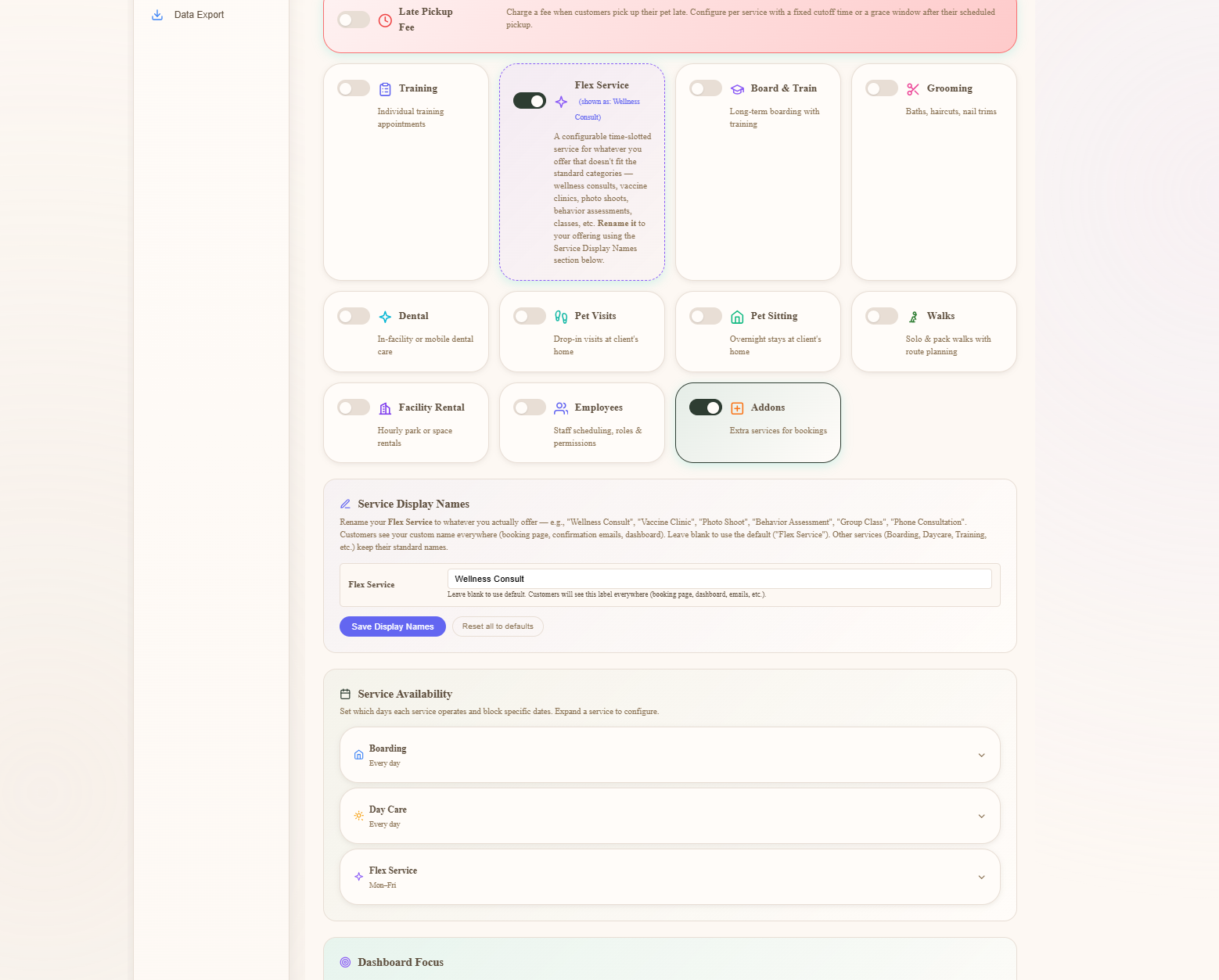
The admin nav, the customer dashboard, the booking flow, the confirmation email — everywhere the service is named, it shows what you named it. "Flex Service" is the platform's internal label; if your business does wellness consults, the customer sees "Wellness Consult" everywhere. Same for "Therapy Visit", "Behaviour Assessment", "Mobile Vet-Tech Visit", or whatever you call your thing. Renamed once, propagated everywhere.

  • One field in Service Settings renames Flex across the entire app
  • Customer dashboard, booking flow, confirmation emails — all use your label
  • Other services can be relabelled too (Boarding → "Overnight Stays", whatever)
  • Service-type toggles enable / disable each service so customers only see what you offer
Admin Service Settings page showing every service tile — Boarding, Day Care, Flex Service, Board and Train, Grooming, Dental, Pet Visits, Pet Sitting, Walks, Facility Rental, Employee, Add-Ons — each with an Enabled toggle, plus a Service Display Names section underneath with text inputs for renaming each service
Sessions, Formats & Windows

Build the sessions. Pick the formats. Set your hours.

Wellness Consult might be a 30-min phone call at $50, a 1-hour in-home visit at $119, and a 90-minute facility session at $180. Build each session type with its own duration and price. Tick the formats that apply to your business — facility, customer's home, phone, video, any combination. Add multiple time windows for the week with day-of-week pills, so Tuesdays 9-12 and Thursdays 2-5 are bookable but the rest of the week isn't.

  • Unlimited session types — name, duration (hours), price each
  • Four location formats: in-facility, in-customer's home, phone, video
  • Multi-window time slots — multiple ranges per day with day-of-week pills
  • Slot increment toggle — 15 / 30 / 60 minute granularity
  • Standard deposit, waiver, vaccine, surcharge config layers on top automatically
Pricing tab for a Flex Service renamed Wellness Consult — Time Slot Increment toggle, Session Types list, Available Formats checkboxes with in-facility, in-customer's home and phone consultation ticked, Available Windows section with multiple time-window cards each with day-of-week pills, plus Save Flex Service Pricing button
Custom Intake Forms

Wire in any intake form the booking needs.

A wellness consult needs vet history, allergies, current medications, behavioural notes. A behaviour assessment needs trigger lists, household composition, escalation history. A photography session needs preferred shots, owner attendance, outfit/prop notes. Build the form your service actually requires — mixed field types (date, text, single-line, multi-line, chip buttons, yes/no, file upload, required-or-optional) — mark it Required for Booking, and the customer fills it out mid-wizard before they can confirm.

  • Forms target any service, including Flex's renamed sessions specifically
  • Field types: date, text, paragraph, chip-button choice, Yes/No, file upload, year+month
  • Drag to reorder, edit in place, mark fields required or optional
  • Required for Booking toggle — customer can't confirm without filling it
  • Form answers save on the booking, surfaced on the admin detail and pet record
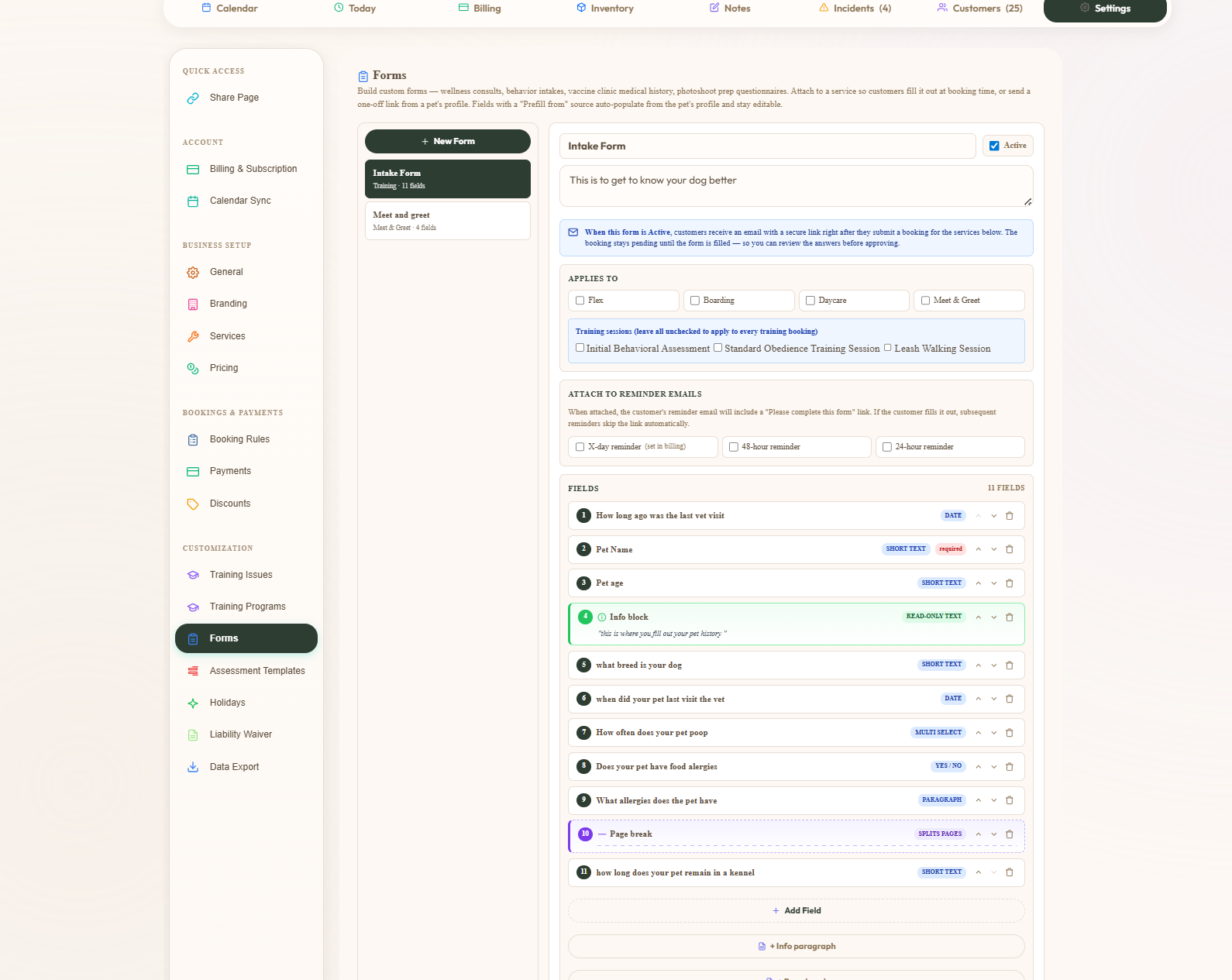
Admin Forms page with an Intake Form template open, an Applies To section with checkboxes for Boarding, Day Care, Grooming, Pet Visits, Walks and Wellness Consult, a list of editable fields including vet visit date, pet name required, pet age year and months, breed, vet visit dates, poop frequency as chip buttons, food allergies Yes/No, and an allergies textarea, with drag handles and edit and delete icons on each row and an Add Field button
Customer view · Booking

Customers book it like any other service.

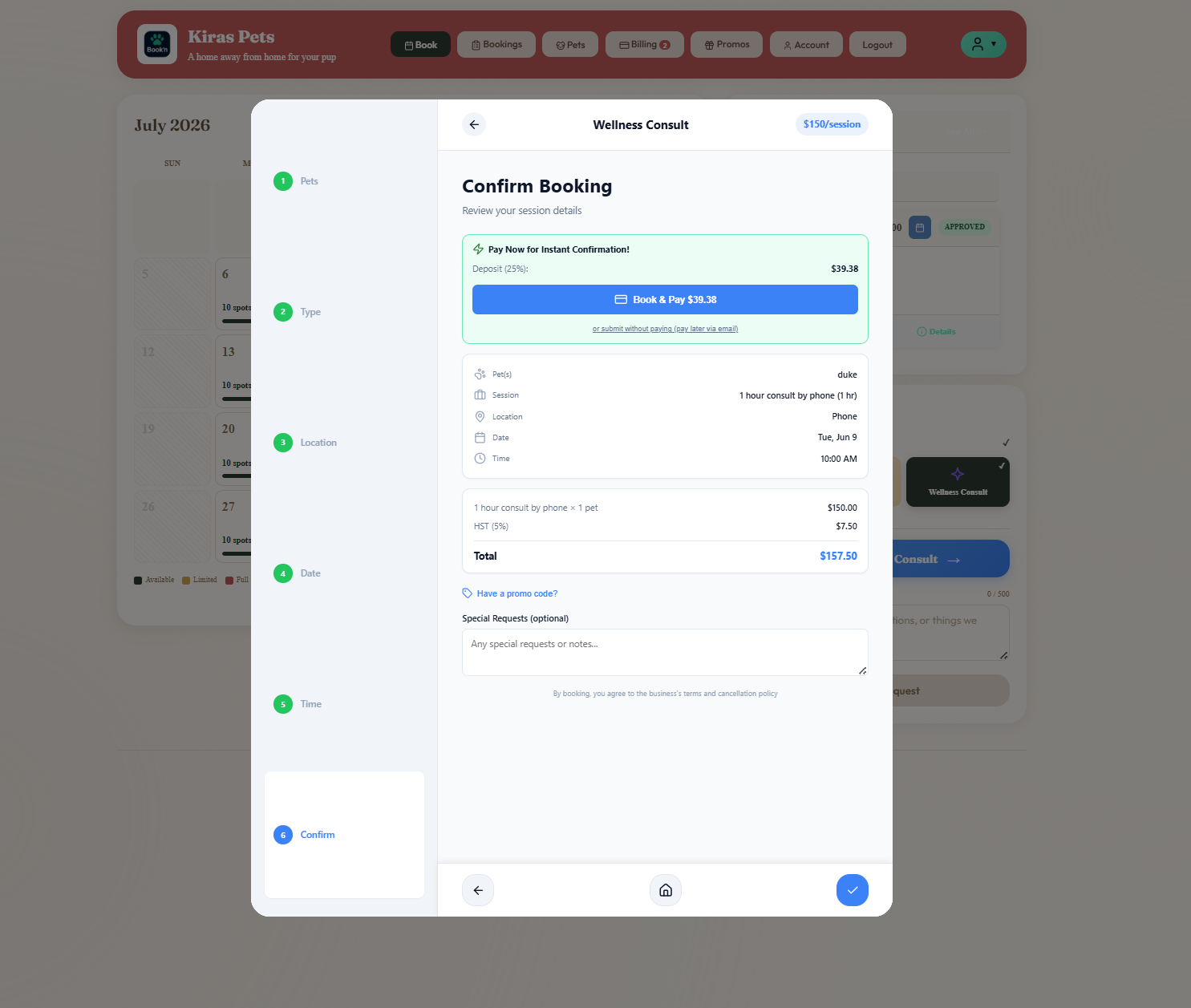
The customer's dashboard shows "Wellness Consult" as one of the services your business offers — right next to Boarding and Daycare, no asterisk, no different flow. They tap it, run through the wizard (Pets, Type, Location, Date, Time, Confirm), and land on a Confirm screen that's identical to the other services with one important detail: it has the price, dates, location format, and itemised totals for the custom service you built. Pay Now for Instant Confirmation or submit without paying — same options as every other service.

  • Same wizard shape as every other service — nothing to learn for repeat customers
  • Confirm step shows the renamed service, your session label, location format, total
  • Pay deposit at booking for instant confirmation, or submit and approve later
  • Promo codes, tax, multi-pet pricing all work because Flex rides on the same engine
Customer Wellness Consult booking modal at the Confirm step showing a Pay Now for Instant Confirmation block with deposit amount and a Book and Pay button, plus an itemised booking detail card with pet, session, location, date, time and total of $107.39 including tax, and a Special Requests textarea
Intake at the right moment

The form you built — in the customer's hands.

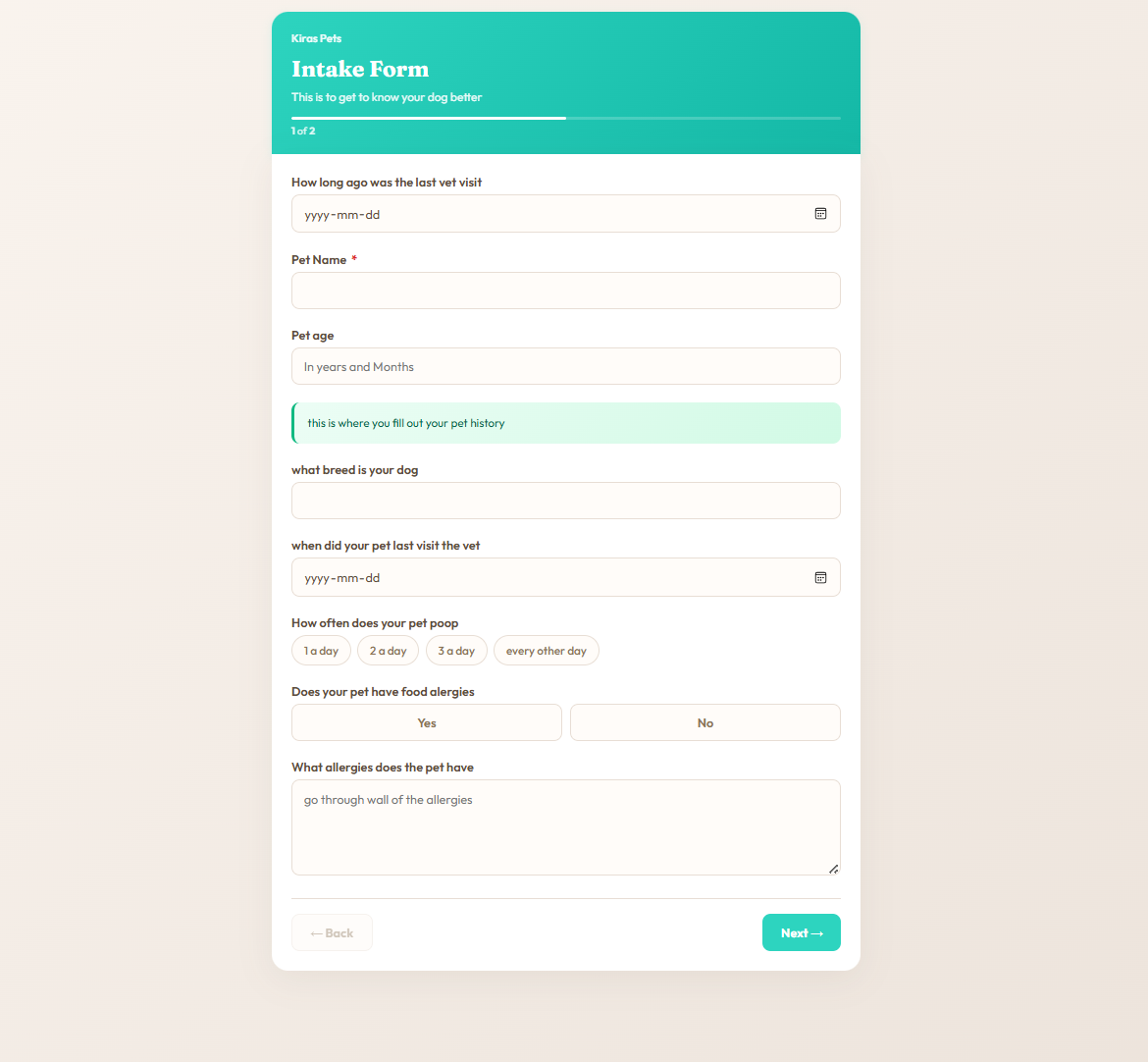
The intake form surfaces mid-booking with a friendly teal header and a clean two-page layout. Date fields render as date pickers, single-line text as inputs, chip buttons as taps, Yes/No as toggles, paragraphs as textareas. The form you built in admin is the form the customer fills out — same fields, same order, same required-or-optional rules. Submit, confirm, done. The answers are on the booking when the appointment opens.

  • Teal-gradient header with your form's title and subtitle
  • Field types render natively — date pickers, chip buttons, Yes/No, textareas
  • Multi-page pagination ("1 of 2", "2 of 2") with Back / Next navigation
  • Required fields enforced — can't proceed without them
  • Answers save on the booking and the pet record — vet sees the history at the consult
Customer-facing custom Intake Form with a teal-gradient header, title This is to get to know your dog better, multi-page indicator showing 1 of 2, fields for last vet visit date, pet name required, pet age in years and months, breed, vet visit date, How often does your pet poop with chip buttons for 1 a day 2 a day 3 a day every other day, Does your pet have food allergies Yes No buttons, and an allergies textarea, with Back and Next navigation buttons
Customer view · Mobile

Same wizard, on the phone.

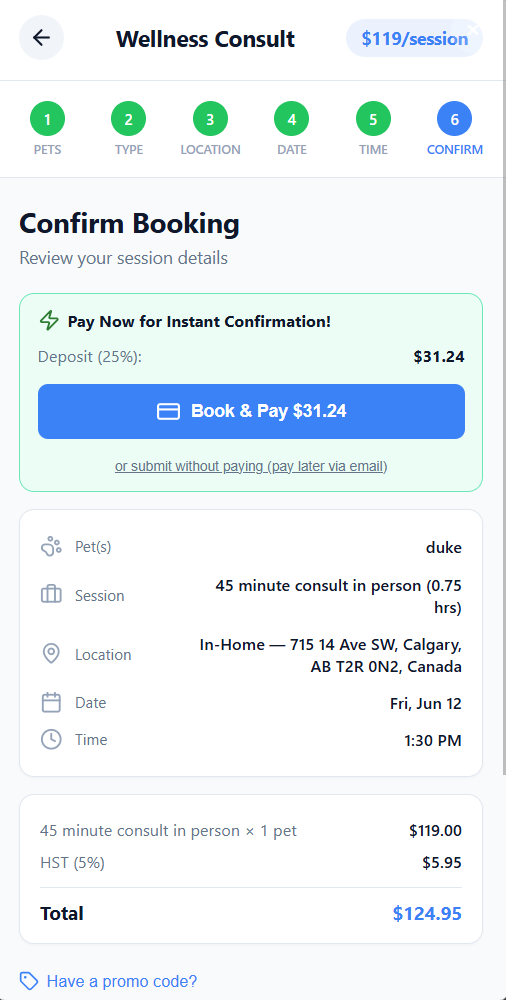
Six steps — Pets, Type, Location, Date, Time, Confirm. The header bar shows your renamed service ("Wellness Consult") with the price per session right there. The Confirm screen lays out every detail: pets, the session you chose ("45 minute consult in person (0.75 hrs)"), location with the full address for in-home bookings, date, time. Pay Now for Instant Confirmation block with the deposit calculated — one tap, booking confirmed.

  • Six-step wizard — Pets · Type · Location · Date · Time · Confirm
  • Header shows your custom service name and per-session price
  • In-Home bookings show the full pickup address inline on Confirm
  • Deposit / Pay-and-confirm or submit-without-paying — per-service configurable
  • Same wizard runs on desktop — one codebase, one experience
Mobile Wellness Consult Confirm step with a $119 per session badge, six-step progress bar with Confirm active, a Pay Now for Instant Confirmation card showing 25 percent deposit of $31.24 and a Book and Pay button, an or submit without paying link, the booking detail showing pet duke, session 45 minute consult in person 0.75 hours, location In-Home with the full address, date Fri Jun 12 and time 1:30 PM, plus an itemised total of $124.95 with HST

Everything else your custom service needs, included.

Vaccination tracking

Customers upload at registration. Expired vaccines block new bookings automatically — including your Flex service.

Digital waivers

Signed once, stored forever. Versioned so you can prove what was agreed before the first session.

Deposits + payments

Stripe, Square or Clover. Per-service deposit percentage. Saved cards on file for the regulars.

Automated reminders

Email + push for confirmations, the day-before reminder, and the appointment-complete wrap-up.

Customer cards on file

Every Flex booking lives on the same customer card as everything else — full history, all services in one place.

Travel-time guard

For in-home Flex sessions, the calendar blocks back-to-back bookings when the drive between addresses won't fit your buffer.

Two-way messaging Beta · Add-on

Customer messages you about the booking, photos attach. Currently in beta — available as an optional paid add-on.

Xero & QuickBooks sync

Every invoice, every payment, every customer — straight to your accounting. GST / HST / VAT codes handled.

Unified checkout

Final invoice + retail (treats, take-homes, supplements) on one screen. Square Terminal, Clover, cash, cheque, custom.

Questions people ask

What if my pet service is not boarding, daycare, grooming or walking?

The BooknBuddy flex service lets you define your own service: custom session types, intake forms, locations and prices, with the same online booking, payments and customer app as every other service.

What does it cost?

CAD $39.99 a month flat, 30-day free trial.

What does your business actually do?

Free 30-day trial. No credit card. Build the service you actually offer, name it whatever you call it, wire in the intake form your appointments need, and take a real booking on the same day.

Start Free Trial