Pet Boarding

Boarding that runs itself.

Suite-by-suite calendar, a daily ops dashboard that matches reality, multi-pet bookings, and a one-screen checkout that does the inventory, the discounts, the GST, and the Square Terminal — all in one tap.

30-day free trial No credit card Cancel anytime
BooknBuddy boarding suite/kennel calendar showing each kennel as a row with color-coded bookings across the next two weeks
10+
service types under one platform
1 screen
checkout: stay + retail + tip + GST
24/7
customer self-service booking
$39.99
CAD/month flat — no booking fees
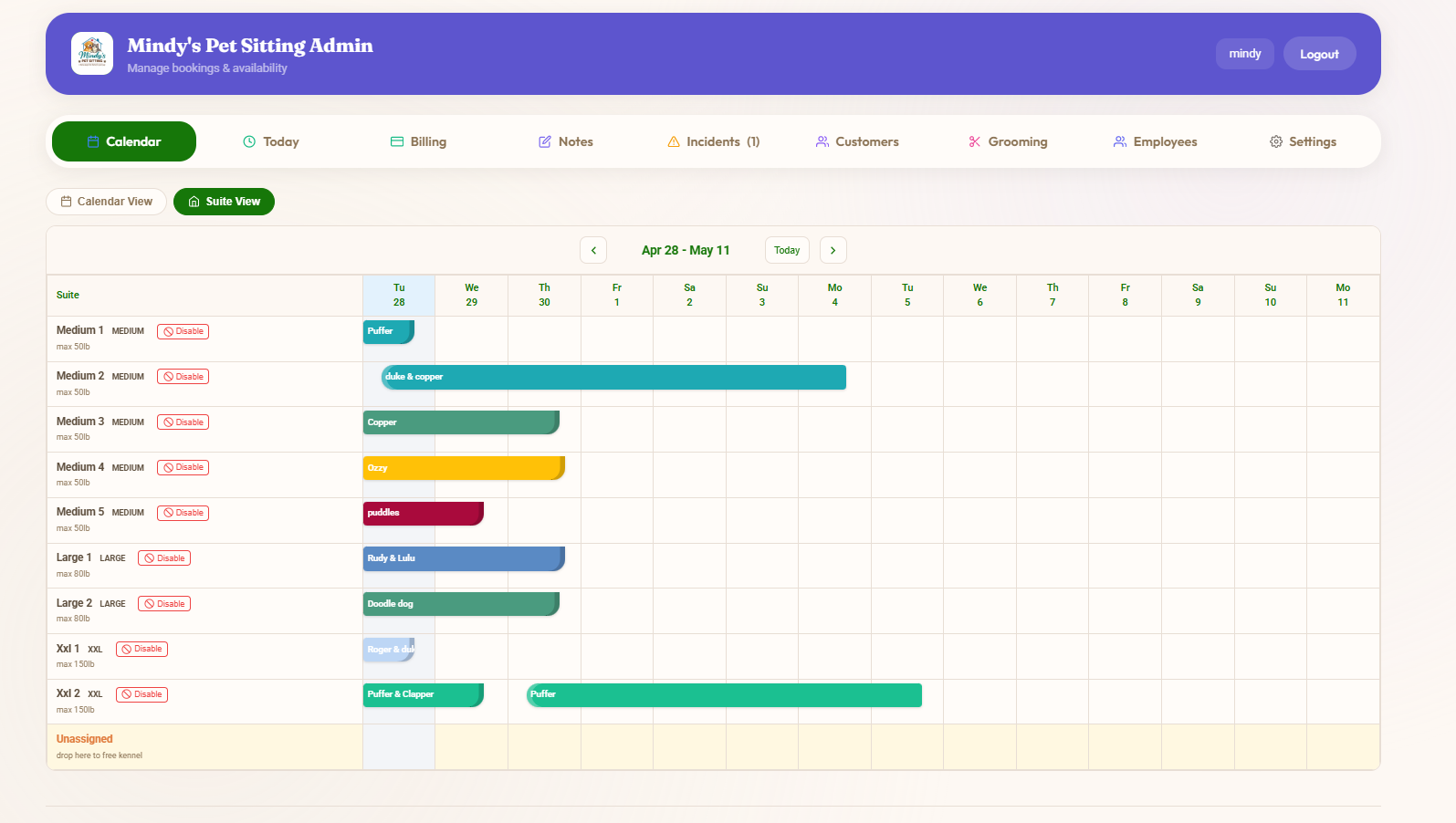
Suite Management

See every kennel, every night, at a glance.

Each suite is a row. Each booking is a colored bar. Drag to reassign. Disable a suite for maintenance. Spot a conflict before it happens — without flipping between screens or pulling a paper book.

  • Per-suite weight limits and pricing tiers
  • Disable individual suites for maintenance or splits
  • Drag-to-reassign across the calendar
  • Unassigned drop-zone for last-minute holds
Suite View calendar showing 9 named kennels with color-coded bookings across two weeks
Daily Ops

Your morning, in one screen.

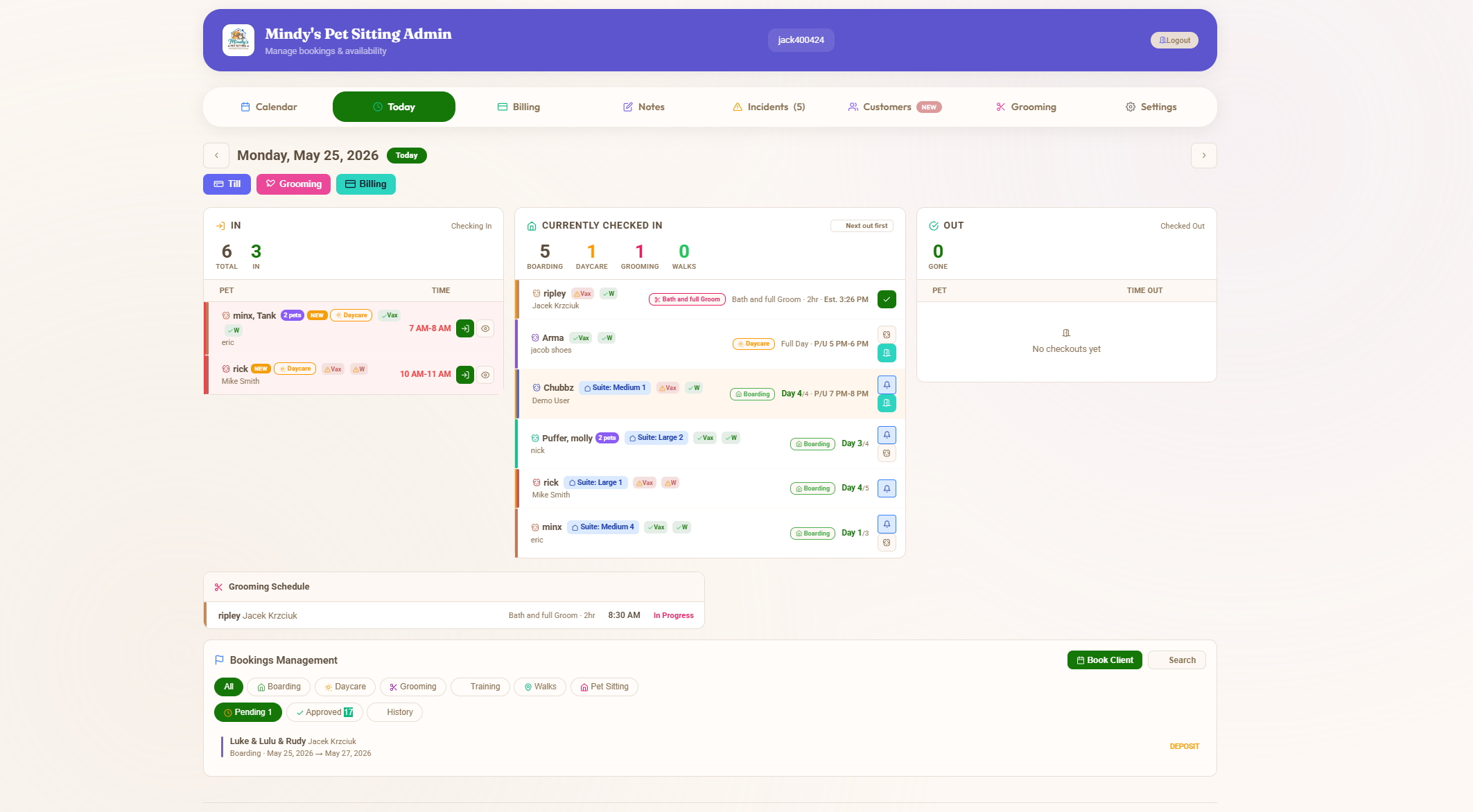
Drop-offs on the left. Currently checked-in in the middle. Pickups on the right. Counts at the top. The Today view matches reality — no spreadsheets, no whiteboard, no "wait, who's coming today?"

  • Live IN / CHECKED-IN / OUT counts
  • One-tap check-in / check-out from the card
  • Day-count badges per pet (Day 2, Day 5, etc.)
  • Wellness, facility rentals and grooming roll into the same view
Today dashboard showing IN, currently checked in, and OUT counts with a list of every pet in the building
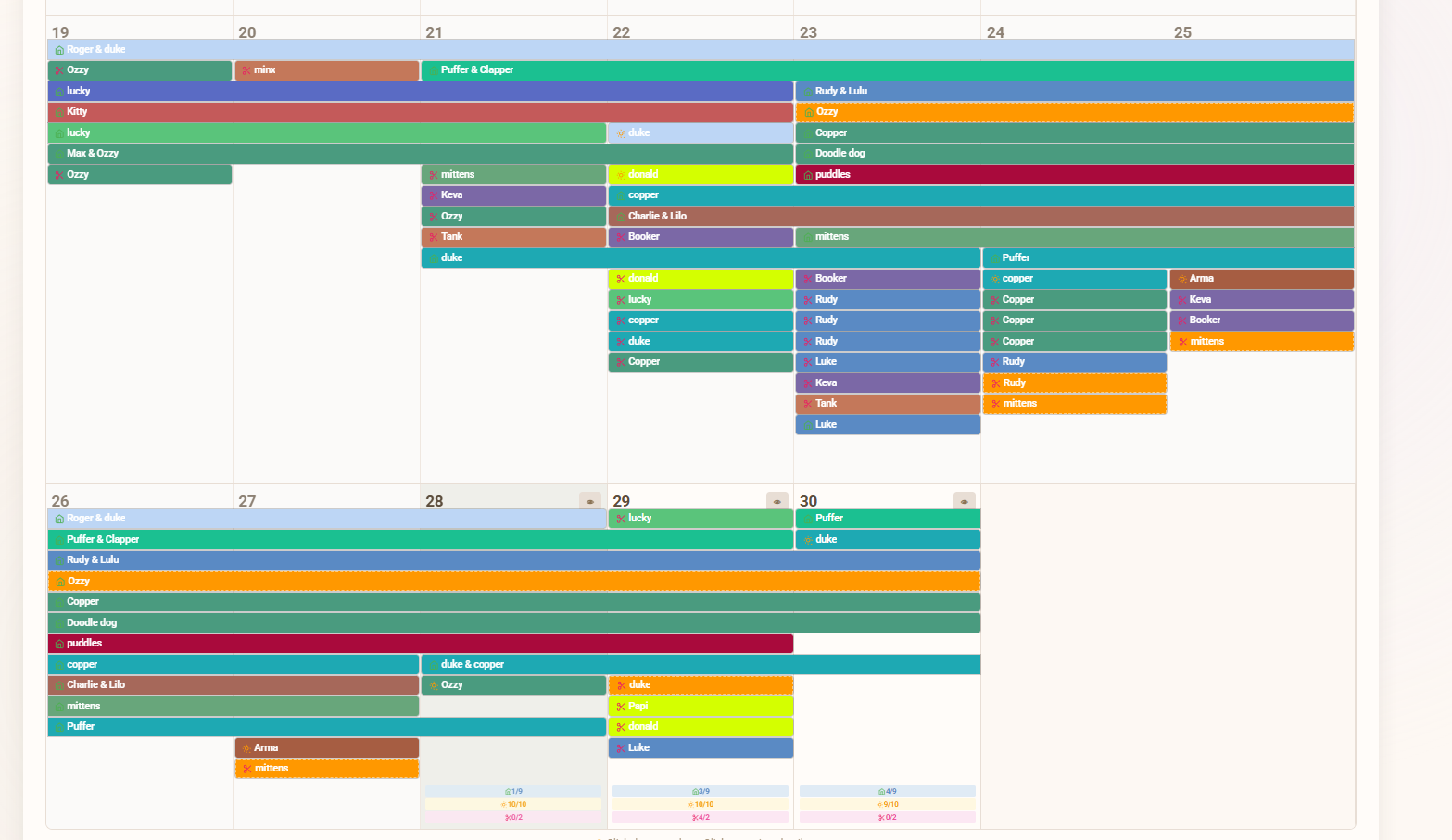
Calendar Overview

Month-at-a-glance for every pet.

Color-coded by status, named by pet, sorted by stay length. Tap any booking bar to open the full record — pet profile, vaccinations, notes, payment status, and the whole stay history.

  • Multi-pet families show as joined bars
  • Status colors match the rest of the app
  • Holiday and weekend surcharges visible inline
  • Drag-edit dates on the fly
Full-month boarding calendar with every pet's stay shown as a colored bar across days
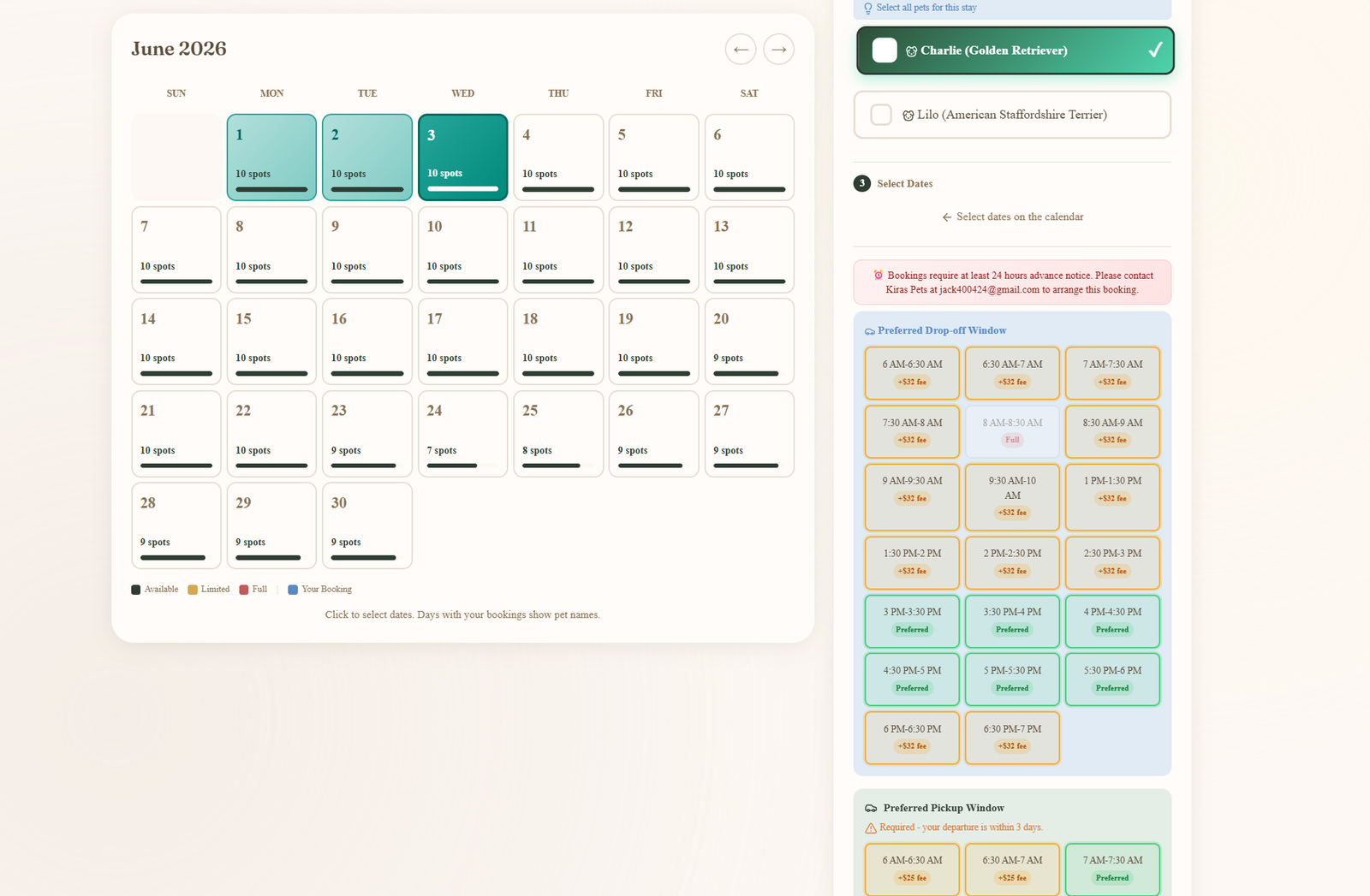
What the customer sees

Self-serve booking with real availability.

Customers pick their pet, see exactly which nights are open on the month calendar, and lock in the drop-off and pickup windows you've configured. Minimum-notice rules, vaccine requirements and your operating hours are all enforced on this screen — so what reaches your inbox is already bookable.

  • Per-pet selector — vaccine status checked before the calendar even unlocks
  • Live month calendar — green = open, grey = booked or blocked
  • Drop-off & pickup window grids built from your business hours, multi-pet aware
  • Minimum-notice and weekend cut-offs surfaced inline — no surprise rejections
Customer booking view — month calendar on the left with available dates highlighted, pet selector and preferred drop-off and pickup window grids on the right
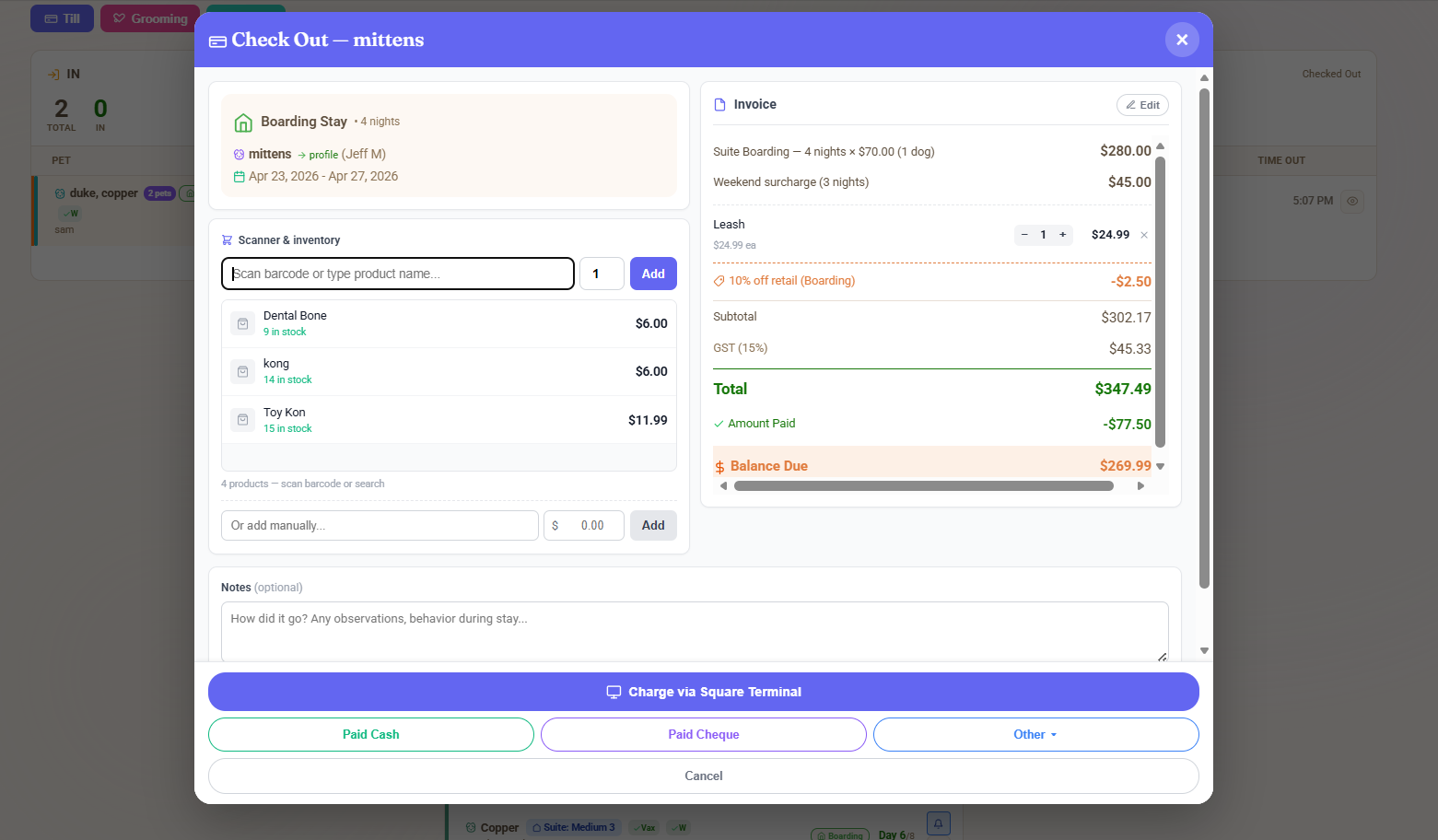
The Unified Checkout

Stay, retail, tip, GST — one screen.

This is what every boarding business wants and almost no software actually does. Open the booking, scan the dental bone and the Kong into the same till, apply the boarding-retail discount, take payment via Square Terminal, cash, cheque or any custom method. Done. Receipt sent. Books reconciled.

Unified checkout modal showing the boarding stay, scanner-based retail add-ons, line-item invoice with discount and GST, and four payment method buttons including Charge via Square Terminal

Scan retail in

Inventory scanner inline with the boarding line items. No bouncing to a separate POS.

Discounts & GST handled

Boarding-bundled retail discount and GST 15% line items applied automatically. Pushes to Xero with the right tax codes.

Take any payment

Square Terminal, cash, cheque, e-Transfer, or any custom method. Tip captured automatically when amount received exceeds the total.

Everything else boarding needs, included.

Time-window drop-off & pickup

Customers pick a window in advance. Plan the day instead of reacting to it.

Multi-pet bookings

Same family, same stay — one booking, one invoice, separate notes per pet.

Vaccination tracking

Customers upload at registration. Expired vaccines block new bookings automatically.

Digital waivers

Signed once, stored forever. Versioned so you can prove what was agreed.

Per-service deposits

Charge a boarding deposit at booking, the rest at pickup. Configurable per service.

Automated reminders

Email + push notifications for confirmations, drop-off, pickup, and balance due.

Daily photo updates

Send a photo of the dog playing during the stay. Pet parents love it. Reduces "is my dog okay?" calls.

Xero & QuickBooks sync

Every invoice, every payment, every customer — straight to your accounting. AU + NZ GST handled.

Split-Kennel for multi-pet

Big family books one stay across two suites. Joint check-in, separate cards, one final receipt.

Kennel management, in detail

The rules a boarding kennel runs on, and how the software carries each one. All of it is set by the business.

Assignment and capacity

  • Every kennel or suite has a size and a weight range. A new booking is assigned to the first kennel that fits the dog, counted from today, so a stay that starts next week never blocks a kennel that is free this week.
  • Drag and drop to override any assignment. Capacity is enforced per kennel and per day; an overbooking is refused, not warned about later.
  • Shared rooms for cats or small dogs with their own per-room capacity.

Families: share or split

  • Two or more dogs from one home can share a kennel or be split across kennels at booking.
  • A dog can be moved into or out of a shared kennel part-way through the stay. The change is recorded with its date and each dog keeps its own price.
  • Multi-pet discounts follow the kennel arrangement, so the invoice matches what actually happened.

Pricing and pickup windows

  • Per-night pricing, or per-day pricing on a 24-hour clock. One setting, and the estimate, the invoice and the owner's app all follow it.
  • Preferred drop-off and pickup windows at no charge; other times offered at an extra fee, or blocked. The fee shows before the owner confirms.
  • Extended-stay tiers, weekend and holiday surcharges, late-pickup fees that escalate by the hour, and a standing percentage discount per customer such as a military discount.

Policies that run themselves

  • A cancellation policy with a notice window and what is kept; a cancellation inside the window applies it to the deposit and the invoice automatically.
  • Deposits or pay-to-book per service, vaccination expiry that blocks a booking until the new record is uploaded, and waivers signed once and versioned.
  • Daily photo updates and two-way messaging to the owner during the stay, and one checkout for the stay, retail, tips and tax at pickup.

Questions people ask

Which pet boarding software manages reservations, check-ins, kennel assignments, payments and owner updates in one place?

BooknBuddy does all five on one screen. Reservations come in online or from the desk, each dog is checked in and out against its stay, kennels and suites are assigned by drag and drop with capacity enforced, the unified checkout takes deposits, balances, retail and tips, and owners get photo updates and messages in their app during the stay.

Does it track kennel capacity and vaccination records?

Yes. Every kennel or suite has a capacity and a size rule, the calendar refuses an overbooking, and a dog with an expired vaccine cannot be booked until the new record is uploaded. Owners upload vaccination records themselves at registration.

What does BooknBuddy cost for a boarding kennel?

CAD $39.99 a month for the business, every feature included, with a 30-day free trial and no per-booking fees. Card payments through the platform carry a 1.5% platform fee on top of Stripe or Square processing.

Can owners book and pay online?

Yes. A booking widget goes on your website or you share a link. Owners pick dates, add-ons and pickup times, pay a deposit or the full amount, and manage the booking from the BooknBuddy customer app.

Does it assign kennels automatically by the dog's weight?

Yes. Each kennel or suite carries a size and weight range, and a new booking is placed in the first kennel that fits the dog, counted from today so a stay that starts next week does not block a kennel that is free this week. You can override any assignment by drag and drop.

Can two dogs from one family share a kennel, or be split?

Both. A family can share one kennel or be split across kennels at booking, and a dog can be moved into or out of a shared kennel part-way through the stay. Each dog keeps its own price and the change is recorded with its date.

Can I charge for pickup outside my preferred windows?

Yes. Set preferred drop-off and pickup windows at no charge and offer other times at an extra fee, or block them. The fee is on the booking before the owner confirms.

Per night or per day?

Either. A business chooses per-night pricing or per-day pricing on a 24-hour clock, and the engine, the invoice and the owner's estimate all follow that one setting.

Is the cancellation policy enforced automatically?

Yes. You set the notice period and what is kept, and a cancellation inside the window applies the policy to the deposit and the invoice without staff doing the maths.

Can I give a customer a standing discount, for example military?

Yes. A percentage discount can be set per customer and per service, and it applies on top of the calculated price on every booking they make.
Ready to run your kennel from one screen?

Free 30-day trial. No credit card. See your suites, your today view, and your unified checkout up and running before you commit.

Start Free Trial